Top Tools to Maintain Academic Integrity in Writing Assignments
Completing assignments now includes having to think about proving you wrote it yourself, so here are the tools that can help.


As AI comes further under the spotlight in education, so too does academic integrity: with more than half of US teenagers having used AI chatbots to help with schoolwork, according to Pew, it has never been more necessary to be able to prove that you wrote a piece yourself.
There are tools and resources that can help make the process easier, but knowing which ones are appropriate for your assignment can be complicated, as there are so many out there, and each has its own quirks and specific features.
Here, we’ll look at eight of the best, what each of them can help you with, and the smartest way to use them as you put together your assignments. By the end, you'll know which tools can help you maintain your academic integrity and preserve evidence of your writing process.
TL;DR
Academic integrity is about being honest in your work, whether that is acknowledging others’ ideas or showing exactly how you reached your conclusion. The best approach is a layered one, as there are different tools that can help with various parts of the process, from AI detection to plagiarism checking, and documenting your writing history. Before using any tool, make sure to check if your course permits it.
What is Academic Integrity?
Academic integrity means acting with honesty, trust, fairness, respect and responsibility in learning, teaching and research, as this video from RMIT in Australia explains.
Integrity is “the quality of being honest and having strong moral principles that you refuse to change,” according to the Cambridge Dictionary. Academic integrity is no different: it’s about being truthful about your work, which includes crediting others’ ideas when you refer to them and following the set guidelines for your assignment. Beyond avoiding plagiarism or cheating, Ohio State links it to the values of honesty, trust, fairness, respect, and responsibility.
Academic integrity means that whoever is reading your work should be able to grasp exactly which parts you came up with, which sources you used, and any other help you received. It doesn’t mean that you never use AI (if the assignment permits it); it means that you’re upfront about how exactly the assignment came to exist. This is what makes sure that you truly have the chance to grow and show your understanding of the topic.
Issues with academic integrity arise if you copy without acknowledging the other person’s work, alter a few words from a source without paraphrasing it, make up references or submit work you created through tools that weren’t allowed. Since these issues don’t all crop up in the same way, checking academic integrity thoroughly often goes further than running a single scan.
Best Tools to Maintain Academic Integrity
Before using any of the below, check that your course permits it and that you’re allowed to upload the material involved.
1. GPTZero AI detector: see AI-related flags
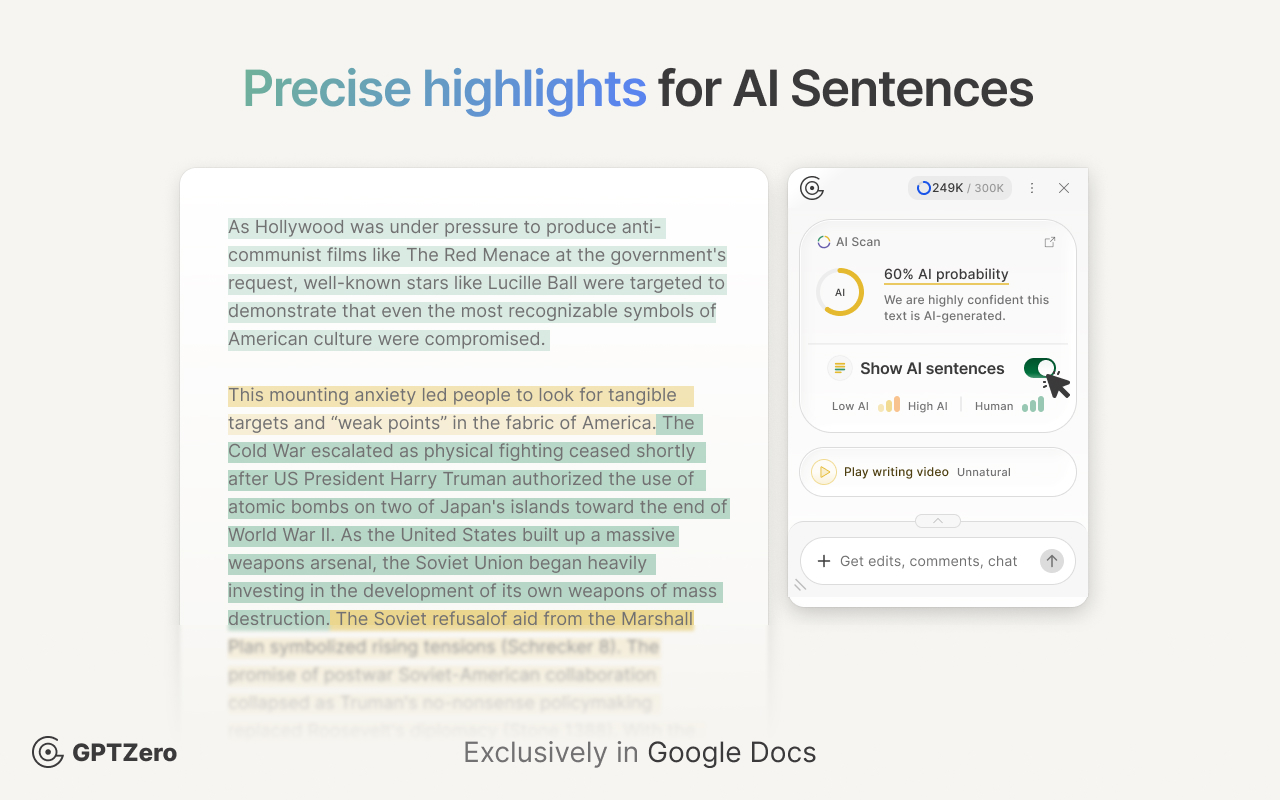
Our AI detector analyzes patterns across your writing and classifies a document as human-written, AI-written, or mixed, alongside confidence information and sentence-level highlights. This can help you understand which parts of a document may need a closer look because they could sound like AI (even if you wrote them yourself).
As more instructors are using AI detection tools these days, it can be very useful to run a quick scan because no AI detector is perfect: human writing can be flagged just like AI-generated writing can be missed. These are our signs of telltale AI writing and how to lower your AI writing score.
2. GPTZero plagiarism checker: review similarities with existing sources
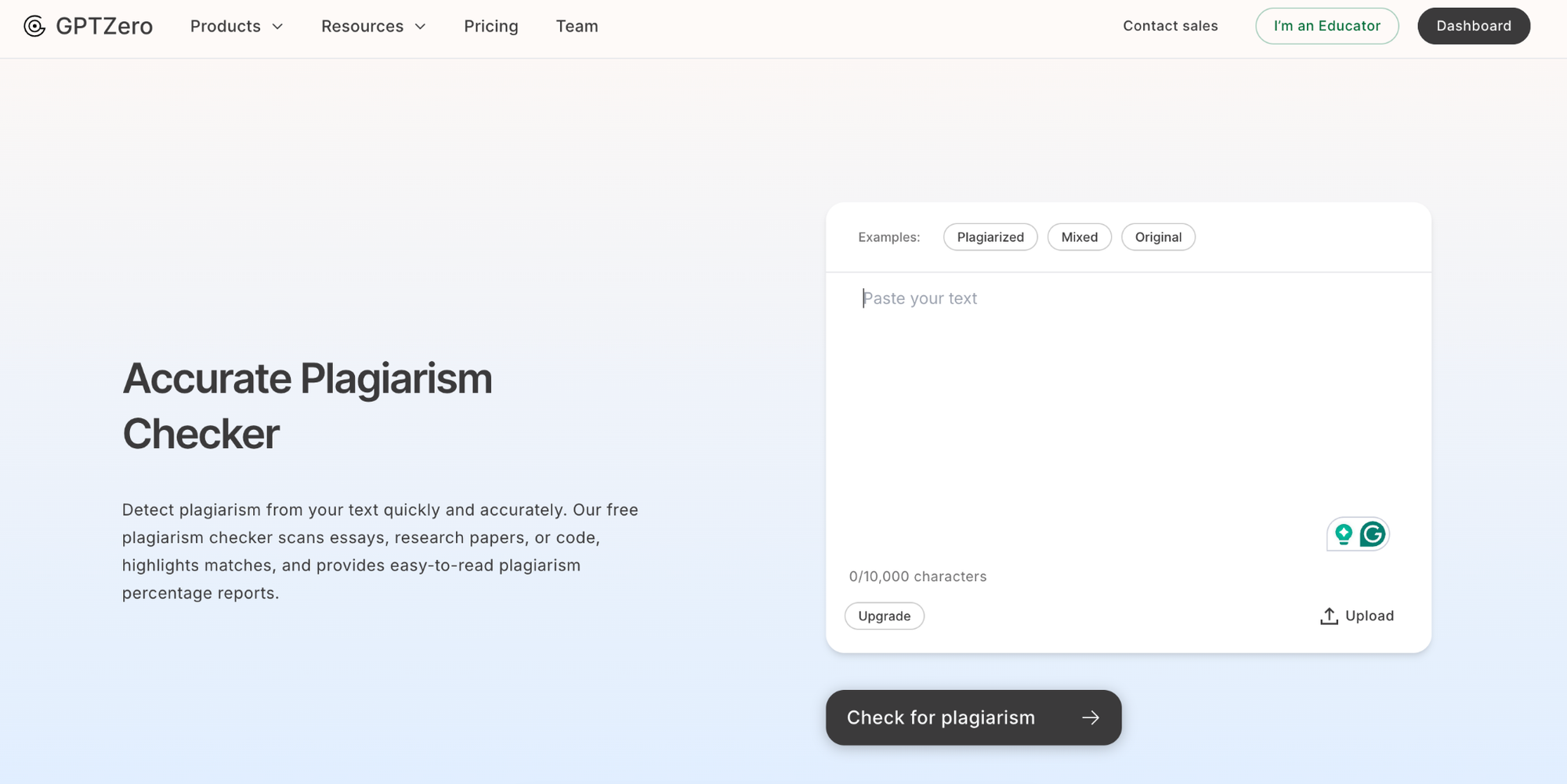
An online plagiarism checker takes your writing and compares it with material in its source collection to identify passages that look comparable. Our plagiarism checker gives a similarity report and links to matched sources, which can help you find wording that might need quotation marks or attribution.
This can be especially helpful when you reach the final part of a research assignment and have worked with multiple sources. It allows you to see which parts of your work you might have forgotten to attribute to someone else.
3. Grammarly: review grammar and clarity
Grammarly can help you articulate your ideas more effectively by checking your spelling and grammar and also giving writing suggestions, which you can choose to accept or reject. Use it once you’re close to completing your draft, and see if the suggested edit improves a sentence while still staying close to what you mean.
Check which features your assignment permits, and don’t assume every suggestion is appropriate for your subject, as some edits that sound better at first might actually change the underlying meaning of what you were trying to say.
4. Zotero: keep your research and references together
Zotero can be useful for longer assignments like a literature review, as it helps you gather your sources and categorize them into collections, as well as adding notes, citations and bibliographies. It also integrates with Word and Google Docs.
You can create a collection for your assignment, adding sources as you read, as well as the specific finding you might use and the page number. Later on, this can save you an enormous amount of time when you need to figure out where one of the points in your assignment came from.
5. Purdue OWL: learn how to use sources properly
Purdue University’s Online Writing Lab has free guidance on citation styles, quotation and paraphrasing, and this can be helpful if you’re struggling to acknowledge a source in the right way, or trying to gauge if your wording is too similar to the original. Its paraphrasing guide recommends: “Set the original aside, and write your paraphrase on a note card.”
This works when it comes to digital notes as well: read and re-read until the passage has sunk in, then put the passage away, then explain the idea yourself and check that you’ve preserved its meaning, remembering that you’ll still need a citation.
6. Google Docs version history: preserve your drafts
Inside Google Docs, version history helps you see earlier drafts so that anyone can spot changes made to a document. You can also name important versions, making the milestone stages like outline, first draft and revision quick to find.
However, it means you have to keep working inside the same document and also remember to name any particular version before a major revision; plus if you drafted elsewhere, you have to remember to keep that material too, as well as your notes outlining why you might have evolved your argument or explained research you did separately.
7. GPTZero Writing Report: show how your paper developed
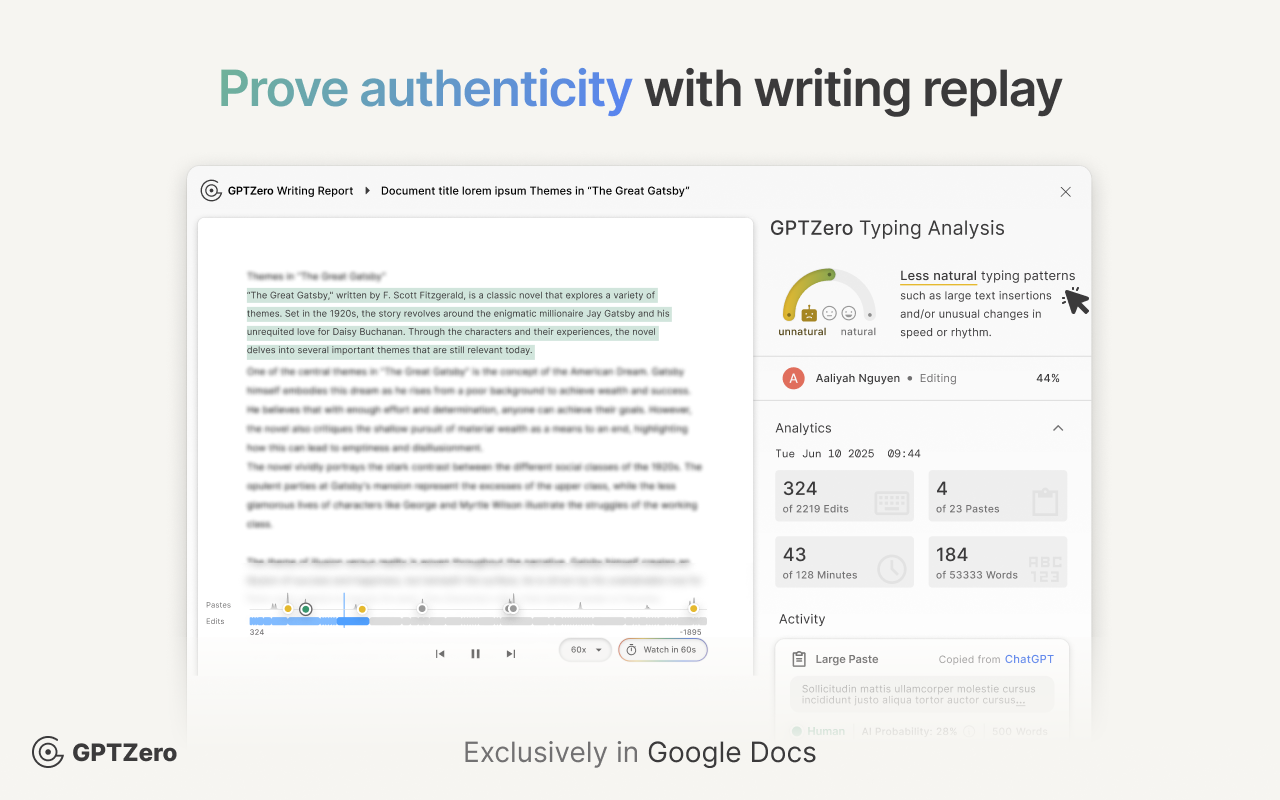
These days, having automatic proof of authorship can make life a lot easier. Our Writing Report is a way to show your writing process, including writing-activity insights, information about larger paste events and a Writing Replay video showing the document’s development.
Perhaps the most useful thing is that you can export the report as a PDF to submit alongside your assignment, which can help if you need to walk anyone through exactly how your paper came to be.
8. GPTZero Hallucination Detector: investigate questionable references
Our Hallucination Detector helps to show any potentially fabricated citations and poorly supported claims for review, and can suggest sources relevant to claims in your text. This is particularly useful if you’ve used (permitted) AI assistance in your research process or are checking references that sound legitimate but are actually very difficult to track down.
Follow up by opening the actual source and make sure to check that the author, title and publication details match, as well as double-checking the actual passage you’re relying on, as a genuine paper can still be cited for something it never says.
Why You Need More Than One Tool
Which tool or approach is most useful for maintaining academic integrity in writing assignments?
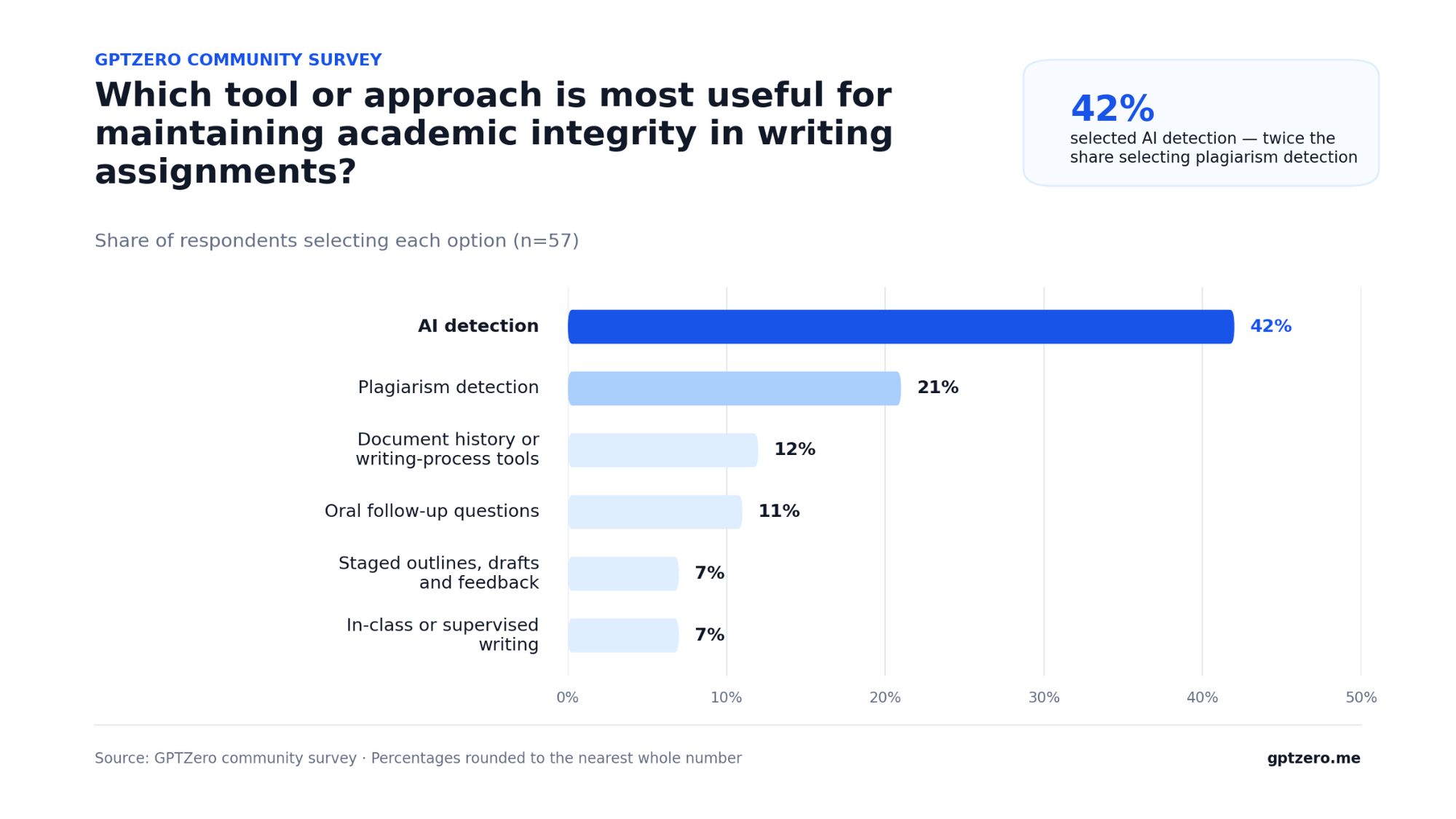
When we spoke to the GPTZero community, AI detection was the most commonly selected tool for maintaining academic integrity in writing assignments, voted by 42%. This was twice the number who selected plagiarism detection (21%), while document history or writing-process tools received 12%.
Still, this does not mean AI detection should be on its own: 58% of respondents chose another approach, including 37% who favoured methods that make the writing process itself more visible. This is why we think the strongest approach is a layered one, using detection as a signal alongside process evidence, dialogue and human judgement.
What is the biggest limitation of the academic-integrity tools currently available to teachers?
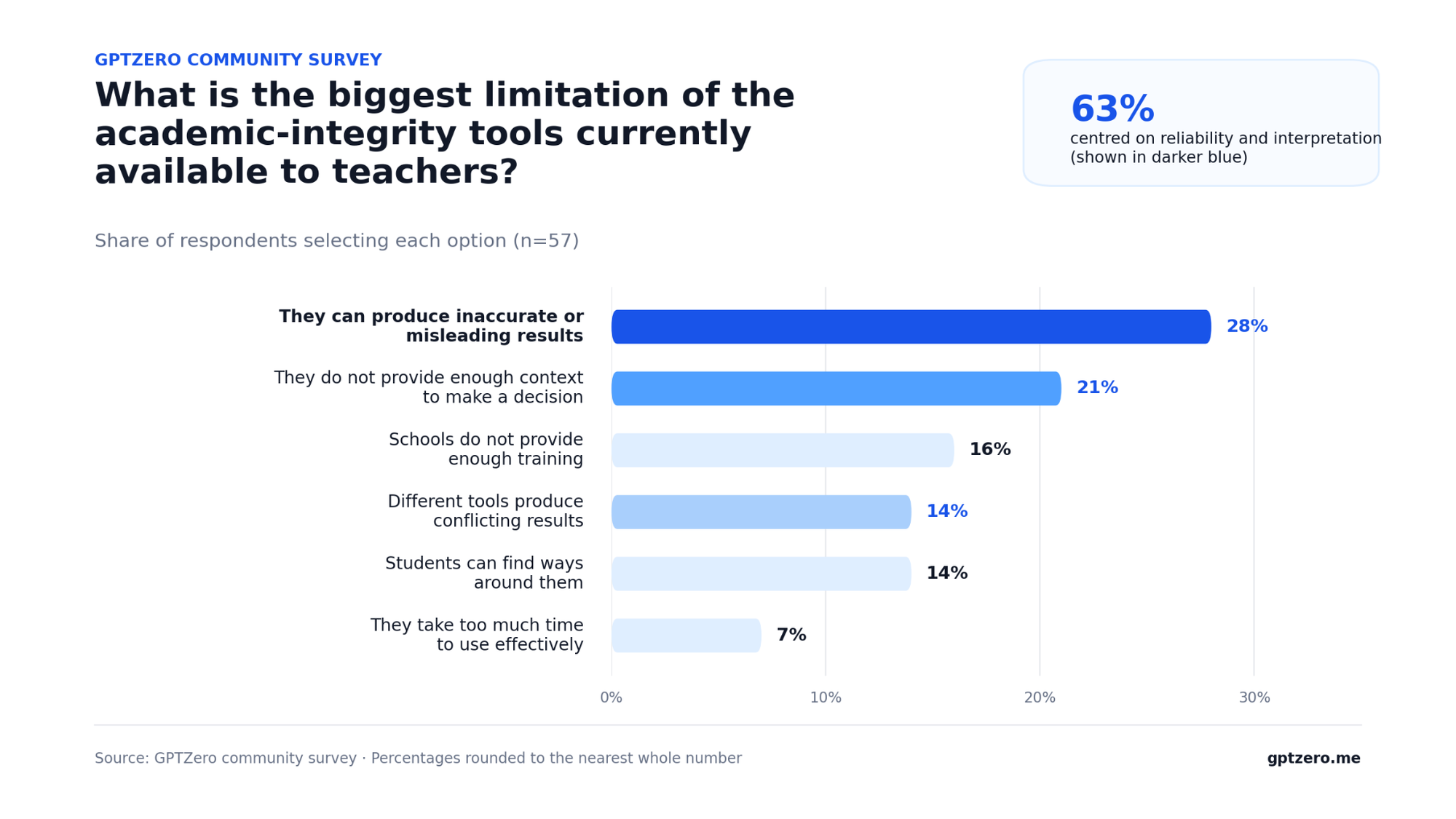
When we asked about the biggest limitation of current academic-integrity tools, 28% said that they can produce inaccurate or misleading results, while another 21% said they do not provide enough context to support a decision. 14% pointed to conflicting results between different tools.
This means that nearly two-thirds of responses focused on reliability and interpretation: whether a teacher has enough consistent information to understand it. A further 16% cited insufficient training from schools, and 14% who said students can find ways around the tools.
The process of putting together an assignment often has various layers, and using different tools strengthens your approach to academic integrity. While the Writing Report might show your process, a plagiarism checker spots any suspicious textual overlap.
While you might not need all eight tools listed above all at once, it’s a good idea to begin with one or two, and then keep building your knowledge from there.
If you want a record of how your assignment developed as you write, create a GPTZero Writing Report and keep it alongside your final submission.
Comparison of Academic Integrity Tools
A Sample Academic Integrity Workflow
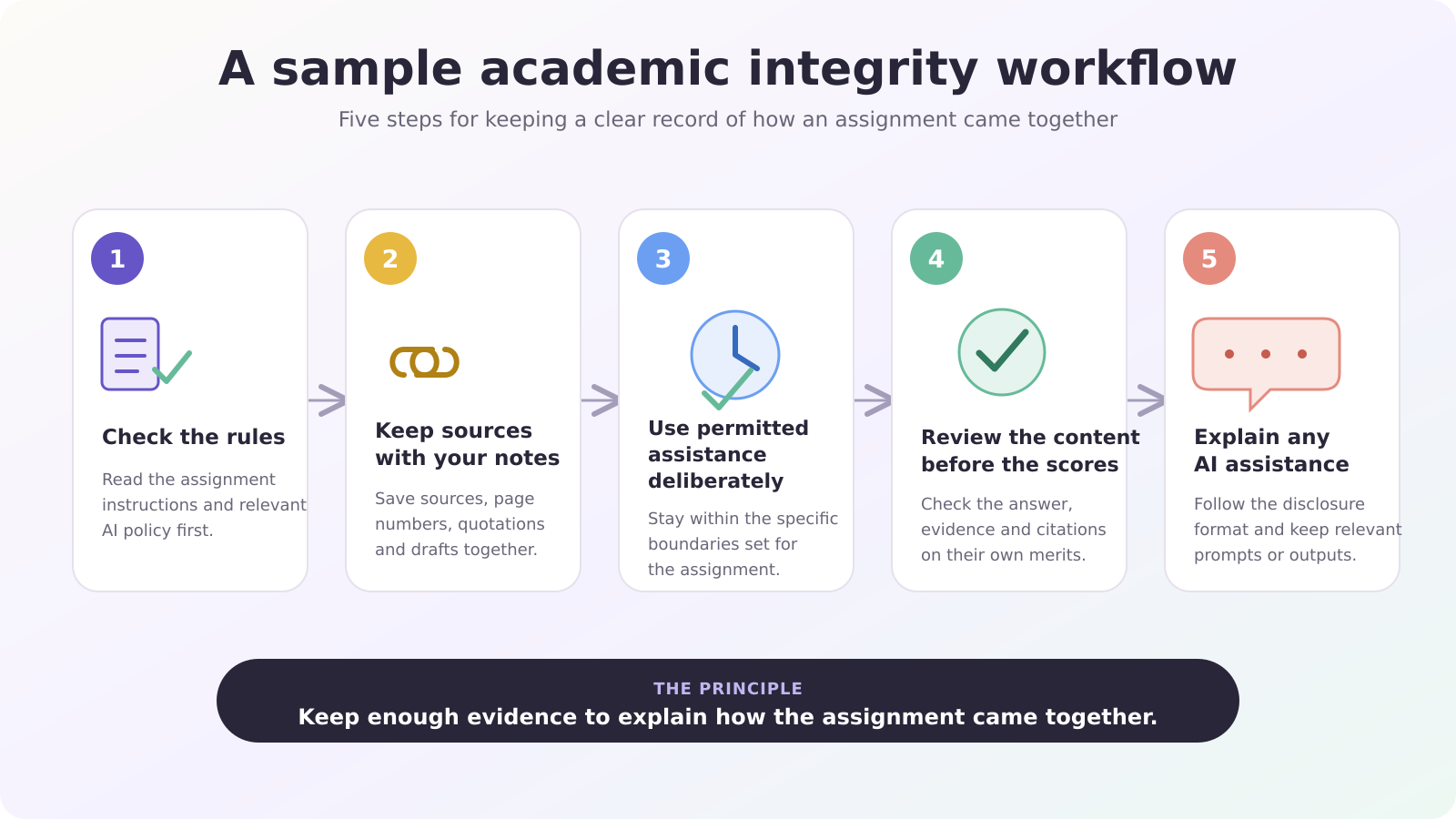
1. Check the rules before you begin
Read the assignment instructions and relevant AI policy: if the rules are hazy, ask your instructor a question that sets the boundaries more clearly, such as, “Are we able to use a grammar checker to identify errors?”
Here is how to build an AI policy that outlines acceptable use and protects academic integrity at your institution.
2. Keep sources linked to your notes
Record the source and page number while you’re reading, and label any quotations so they don’t get mixed up with your own wording. It’s also worth keeping drafts at this stage too.
3. Use permitted assistance deliberately
If your instructor does in fact allow AI-generated practice questions or feedback, keep your use within those boundaries. If an assignment prohibits AI-generated writing, submitting AI-written material as your own would still violate that policy, even if you disclose the tool afterwards.
4. Review the content before the scores
Check that you’ve actually answered the question and cited sources accurately, using the relevant tools to look further into possible problems.
5. Explain any AI assistance
Follow your instructor’s disclosure format to state what you actually used AI for, and make sure to keep prompts or outputs just in case you are asked for them later.
Conclusion
Maintaining your academic integrity is about being transparent about your work and able to explain exactly how it came together. We recommend you check the rules before you begin, preserve your drafts and version history, and use permitted tools deliberately.
Tools for AI detection, plagiarism checking, citation support and writing-process evidence can each help with a different part of the process. However, getting into the habit of keeping a record of how your assignment evolved from blank page to submission is becoming increasingly vital for students.
FAQs
Is using AI for an assignment automatically considered cheating?
Generally, the policies around AI used in assignments differ between institutions and even between classrooms at the same institution, so make sure you follow the policies that apply to your specific assignment, and always disclose any AI use. When in doubt, disclose.
Do I need to cite a source if I paraphrase it?
Yes, you always need to do this, as paraphrasing an idea in your own words doesn’t suddenly make the underlying idea yours. Always credit the source, and use quotation marks when repeating the exact wording.
What if an AI detector flags work I wrote myself?
This is where it helps to keep your original files, gather drafts, research notes and version history, ideally including something like a GPTZero Writing Report, so you can thoroughly explain your process. Our guide to showing you wrote your own paper goes through this in more detail.