How to Prove You Wrote Your Own Paper: A Complete Student Guide
You know you wrote your own paper. Here’s how to show it, and how to build a habit of keeping a record of your process.


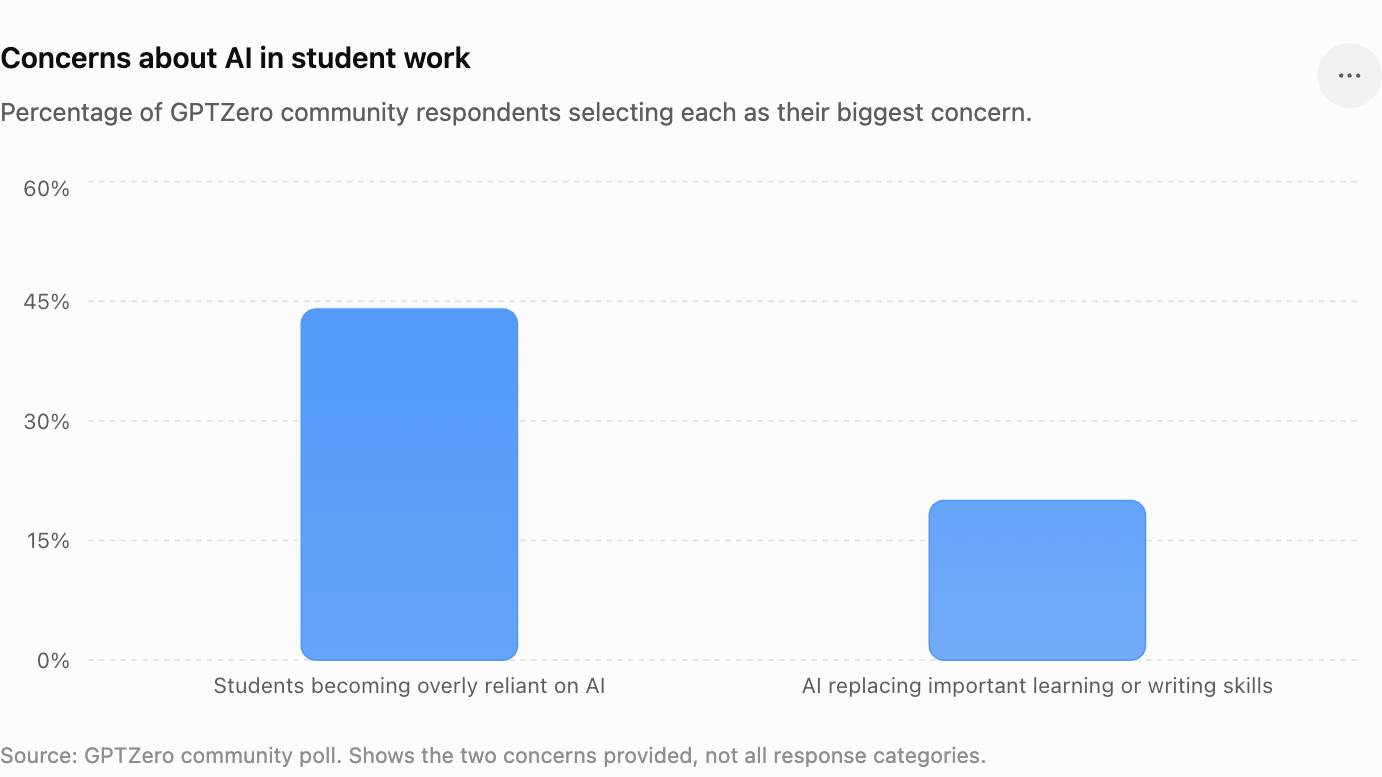
When we asked our GPTZero community about the biggest concern around AI in student work, the leading answer was overreliance: 44% were most concerned about students becoming overly reliant on AI, while another 20% worried that it could replace important learning or writing skills.
According to the survey, the most useful evidence of authorship was a student’s ability to explain their argument and writing process, followed by their sources, research records and document history. What educators are most interested in is protecting the academic integrity process and understanding how a piece of work was actually created.
Knowing how to judge and treat generative AI in education is an area that is evolving incredibly quickly, and we’re keeping an eye on leading institutional reports such as MIT’s 2026 report on AI in education.
In this guide, we’ll go through how to prove you wrote your own paper, how to speak to your instructor, and how to protect yourself against false accusations in the future.
TL;DR
We recommend using GPTZero’s Writing Report to keep evidence of your process, instead of relying on the final piece of work by itself. You also need to be prepared to explain your argument in your own words, and to show how you reached your conclusion. No AI detector is flawless, and a detection result is often a signal to start a deeper conversation (instead of a sign for automatic punishment).
How to Build an Evidence File for Your Paper
Assuming that you wrote the paper yourself, you most likely already have more evidence than you think, and the main thing to do is to gather those traces of your writing process. This could be an early draft or a Google Doc that has all your rewrites, as well as research sources before you submitted.
Taken together, this shows how you came up with the final piece of work. Here are some key pieces of evidence to show you wrote your own paper:
Start with your version history
If you wrote the paper in Google Docs, this is often the easiest place to start, as Google Docs version history will reveal all the various versions of a document, including which updates were made, who made them, and exactly how the text changed.
The process doesn’t have to look neat. In fact, you’ve probably taken out entire sections, moved paragraphs around, or redone the same sentence a number of times. This messiness actually works in your favor as it shows how the final paper developed.
Either take screenshots, or be prepared to open that version history during a conversation with your instructor.
Search for your earlier drafts
Next, look for previous versions of the paper. It helps to look in your Documents and Downloads folders, Google Drive, or your email attachments and course platform. It doesn’t matter if the drafts aren’t complete, because an old version that shows half-written parts is useful exactly because it illustrates how the work came to be.
Earlier drafts are especially useful if they have timestamps, which can then show the logical sequence of events that traces your work to the final submission.
Go back over your research trail
Besides early drafts, your research can also show how the paper was written. Go back and try to find as many sources as possible: bookmarked articles, downloaded PDFs, library searches, handwritten source notes, citation-manager entries, highlighted readings, or browser history connected to the topic.
Ideally, there could also be notes showing questions you were trying to answer as you researched, such as “Need another example for paragraph four.” These sorts of notes show what your thinking was at the time.
If you used AI during your research in a way your course allowed, be honest about that too: there’s a big difference between using AI to suggest search terms and asking it to write your paper. We always recommend using our Hallucination Detector to identify potentially fabricated sources, and an online plagiarism checker can also help you detect any potential plagiarism in your text quickly and accurately.
What If I Wrote Offline or on Paper?
If you think better by drafting in a notebook, or working in Microsoft Word or Pages offline, or doing most of your planning on paper, it’s obviously harder to show your timestamped version history, but you can still gather evidence and demonstrate your academic process in a similar way to the above.
Keep handwritten material
Physical notes can be useful, including handwritten outlines, mind maps, printed sources with notes, and drafts in your notebook. Ideally, though, they would be timestamped so it’s obvious they existed before you were questioned about your process.
If it’s not feasible to bring in all your physical documents, or you want an electronic copy of your evidence, photograph and order the pages accordingly.
Look at your computer files
If you used Word or Pages offline, check your file properties. Word documents can contain created and modified dates, and AutoRecover files may also exist depending on your settings. While a timestamp on its own doesn’t automatically absolve you, when you pair it with drafts and research, along with your ability to explain your thinking process, it can provide a valuable piece of evidence.
In fact, this principle applies across the process: one single data point of evidence might not prove as much on its own, but taken with several other pieces of evidence, the overall story they tell is much stronger.
How to Explain Your Paper to Your Professor
Now that you’ve collected all your evidence into a single spot, it’s time to make it as simple as possible for anyone to see what your process was. Instead of shoving tens of different files, make sure you can tie each piece of evidence to an overarching timeline.
This timeline can be fairly simple, and might look something like:
- Topic idea and early notes
- Research and source gathering
- Outline
- First draft
- Feedback
- Revised draft
- Version history
- Final submission
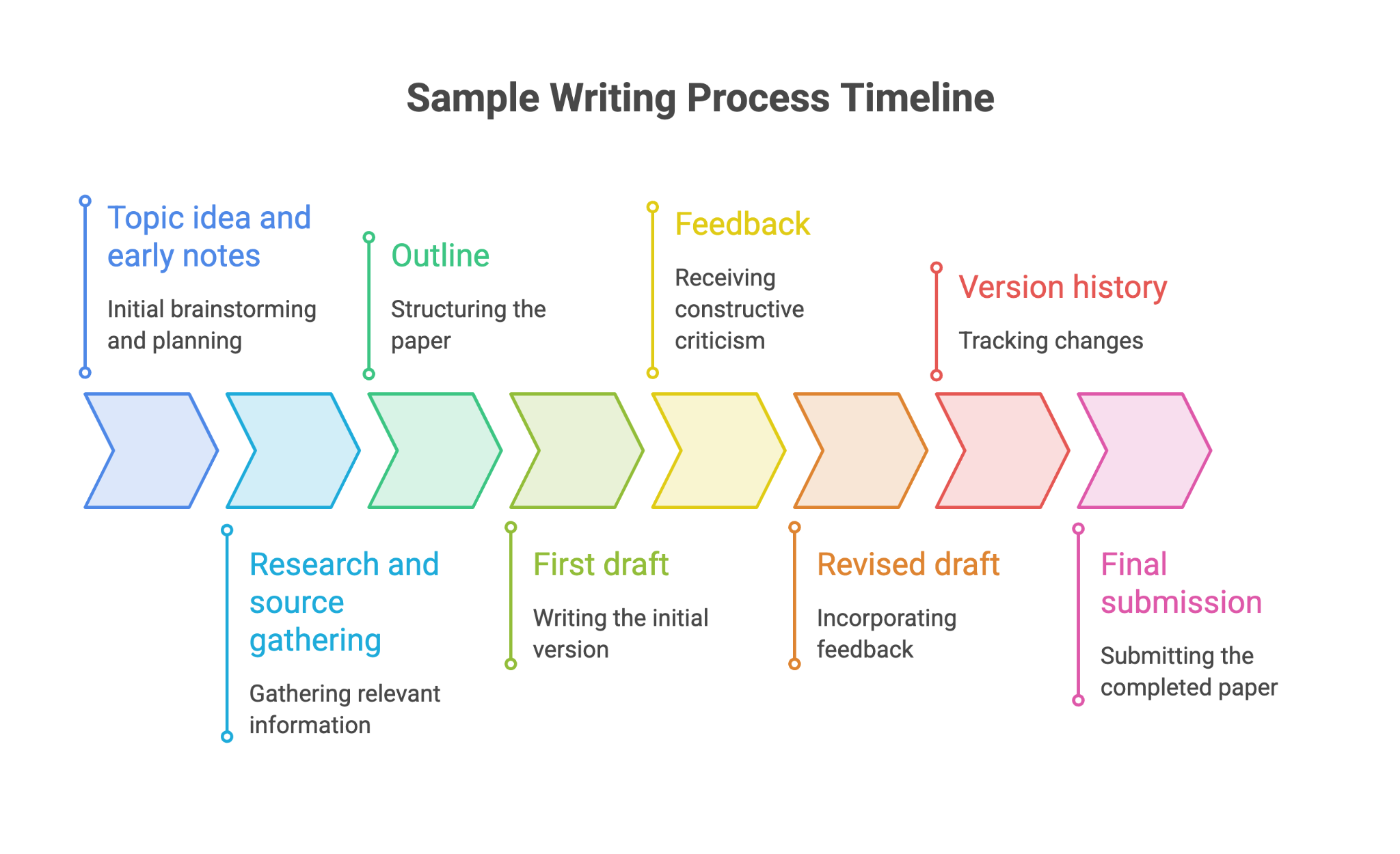
This will show how you got from an initial idea to the paper your professor received.
Be fluent in explaining your thinking
While it can feel frustrating to have to prove yourself, it’s critical that you remain calm and able to explain how you got from point A to B intellectually. In other words, be ready and able to talk about why you chose this topic, how your argument developed, and why you chose certain sources.
Things your instructor might ask could include, “Why this source? Why this argument?” You need to be able to provide a bit of context around your choices, even if you don’t remember every single little detail.
MIT, for example, recommends teaching approaches including “oral exams, semester portfolios, and out-of-class assignments paired with in-class conversations.” If your instructor asks you to talk through your work, being able to explain how your argument developed and why you made particular choices gives very valuable context alongside drafts and version history.
Send a calm email
If the issue first comes up over email, take some time to calm yourself down, because if you reply when you’re angry, you can’t take the email back. Instead, a sensible response could look like this:
Dear Professor [Name],
Thanks for flagging your concern regarding my paper. I’d like to confirm that I wrote the paper myself and would be happy to walk you through my writing process. I have supporting material including [version history / earlier drafts / research notes / source records] that shows how the paper came to be.
I would appreciate the opportunity to share this evidence and discuss any specific sections that raised concerns. Please let me know the best way to provide the materials or arrange a meeting.
Best,
[Name]
This email is opening a door to explaining more of the process, instead of trying to prove everything in a single email. If the situation seems like it’s going to escalate, familiarize yourself with your institution’s academic-integrity and appeals policies so you understand what happens next.
Why Honest Students Get Flagged by AI Detectors
Our own survey with the GPTZero community also shows that 68% said students often or very often worry that their original work could be mistakenly identified as AI-generated, while 86% said this happens at least sometimes.
It’s critical to remember that AI detectors are not perfect, and they rarely send back a yes-or-no response. Instead, an AI detector analyzes patterns in writing and estimates whether the text resembles human or AI-generated language. You can see our interactive walkthrough of the principles behind AI detection, from raw text to classification.
Also, most detection providers warn against treating a result as final proof. And at leading institutions such as MIT, they explain: “the Committee on Discipline (COD) itself does not consider AI detector output alone sufficient.” This means that even at MIT, a detection result is not treated as a verdict by itself: if your work is questioned, the broader context around how you developed the paper matters too.
We’ve long known this broader context matters, which is why our AI Patterns feature identifies, extracts and explains recurring stylistic and rhetorical AI writing patterns in your document, helping you understand what makes a document look AI-like and why. All of this is to say that your paper can be flagged as AI-written even if you know you wrote it yourself.
How to Document Your Authorship as You Write
At GPTZero, we work directly with educators to help them interpret results in context. In fact, a key tool we recommend to our community for tracking the progress of a writing piece is our Writing Report tool, which shows exactly how a piece was written, edited, and pasted.
This can show details such as the document’s lifespan, writing-activity timeline, larger copy-and-paste events, revision duration and multiple editors. Writing Replay presents the document’s edit history as a video, and the report can be exported as a PDF.
Instant replay means you can see the writing process exactly as it unfolded, and there isn’t any lag when you’re reviewing the piece, which is useful in settings if you need to walk through the writing process in real time.
Activity insights show key behaviors like frequent edits and writing bursts, demonstrating how the piece came together. Also, the Writing Report has built-in AI detection, which flags large pastes and unnatural text.
Here, Sawyer shows how GPTZero Writing Report works in practice:
@studywithsawyer This new writing report feature is stopping AI #writing #college #ai #gptzeroambassador #gptzeroad
♬ original sound - Sawyer
What NOT to Do
If you’re accused of using AI when you definitely wrote the work yourself, a lot of people panic, but that can accidentally make the situation worse. Here are some things to make sure you don’t do if you’re accused of using AI in your work.
Don't destroy evidence
Do not delete drafts because they look embarrassing or messy, or try to edit your version history, or assume handwritten notes are useless and throw them out. Those rough materials may be exactly what helps show how the paper developed. Google warns that deleting version history is permanent and cannot be undone, so it’s particularly important not to do that.
Don't create fake evidence
Equally, do not make up drafts, alter timestamps, produce fake handwritten notes, or ask another person to back up a story that is not true. Producing false evidence can become an academic-integrity issue of its own.
Similarly, do not use an “autotyper” to come up with an apparently gradual document history. Our tools are designed to detect unnatural typing and autotyping tools, making attempted fabrication both dishonest and potentially detectable.
Don't lie about AI use that was actually allowed
If your class did allow AI for a specific purpose, explain what you used, as transparency is a much smarter bet than claiming you never touched AI if that is not true.
We’ve always said that the best way to “avoid” detection is to write in your own voice and use AI as a tool, as opposed to a substitute for your work. AI detection is not totally flawless, and so results should be treated as conversation starters. If you do use AI in your process, disclose it, and always follow your school’s policies.
Conclusion
Proving your case comes down to process: your drafts, notes, and research trail, or ideally, your version history. While an AI detector can pave the way for a more detailed conversation, it shouldn’t be used as an automatic verdict.
Rather than trying to prove yourself with another AI detector score, build the strongest possible picture of how your paper came to exist, and then for future work, make sure you keep up those habits of being able to trace your work (even if it’s through notes that don’t make a lot of sense at first, or endless ‘final version’ files).
For your next assignment, use GPTZero's Writing Report to preserve your writing process as you work, giving you a record of drafts, edits, and revisions you can refer back to later.
FAQs
Can a professor fail me based only on an AI detector?
Right now, there isn’t a set and universal answer, as policies differ between institutions and even between instructors. However, we believe that a responsible review should consider the assignment instructions, drafts, version history, previous writing, sources, permitted AI use and the student’s explanation of their process.
What if I don't have version history?
Use whatever genuine evidence you do have, which could include handwritten notes, old drafts, browser records, file timestamps or timestamped messages in which you discussed the assignment.
How can I avoid this problem in the future?
Save your drafts and notes, use version history where possible, and keep records of your research and feedback. Get into the habit of using GPTZero’s Writing Replay to trace how a Google Doc was created.