Sapling.ai Detector Review: Tested on 13 Human & AI Samples
Sapling AI offers a free AI content detector. This review tests its accuracy against both AI-generated & human-written samples and compares it to GPTZero.

AI detectors don't perform equally well on text from every AI model.
This was found in a peer-reviewed benchmark called RAID. It tested 12 AI detectors across more than 6 million text samples generated by 11 different AI models and found that detectors can score above 95% accuracy on one AI model's writing and fall below 60% on another model's writing in the same category.
In this article, I will be testing Sapling’s AI detector myself to see if it behaves the same. I will test it against text from three different AI models, plus a range of human writing samples sourced from content published before AI writing tools existed, to see how consistent it really is.
Read an overview of Sapling AI before the testing starts.
What is Sapling AI?
Sapling AI is a language model toolkit that has two product lines.
It offers a customer-facing writing assistant/copilot that integrates with platforms such as Salesforce, Zendesk, Amazon Connect, and Twilio Flex and provides real-time writing suggestions, grammar corrections, AI detection, autocomplete functionality, and more.
Then there are the standalone text tools, of which the AI content detector and grammar checker are most widely used.
The Sapling AI detector is accessible without a paid subscription, but you can scan only 2,000 characters per attempt. Increasing this limit requires buying a subscription.
You can use the AI detector on the website or access it on Google Docs, Outlook, or Word through its add-ins.
Sapling is also available as a browser extension which lets you scan text for AI on any website without visiting the Sapling website. There’s a Windows and macOS app as well.
In its marketing, Sapling states that its AI detector has a 97%+ detection rate on longer texts and a 3% false positive rate on human-written content. Since most vendor-reported figures aren't independently verified, I will test Sapling against both raw AI-generated and fully human samples to get to the real truth.
Let me explain my testing methodology a little more before running the tests.
How I Tested Sapling AI Content Detector
I wanted to test Sapling AI detector’s accuracy against both AI and human samples, so I designed the test accordingly.
There were two sets of text samples. One set included text samples generated with different AI models, and the other set included human-written samples from across the web.
Here’s a little more detail about the two sets:
- The AI-written set: This set included a total of 6 text samples generated with Claude, ChatGPT, and Gemini. Two text samples were generated with each of these AI models using the same two prompts. One prompt asked for a more informational tone, and the other asked for a narrative-style write-up:
- Prompt 1: Explain how bread baking works from a scientific perspective, covering what happens to the dough at each stage, from mixing through fermentation, shaping, proofing, and baking, and why each stage matters for the final texture and flavor of the loaf.
- Prompt 2: Write a detailed account of someone's last walk through an office building at night before it closes for renovation, including what they notice, remember, and feel as they move from floor to floor.
- The Human-written set: This set included 7 samples sourced from content published before AI-writing tools were a thing. I started from 2019 and went as far back as 1851 to source these samples just to make sure they are actually written by humans. Format-wise, these samples include news articles, an academic paper, a Wikipedia article, a novel, and a video transcript.
Now let’s start the testing.
I will test each sample with Sapling’s AI content detector and report the verdict and AI score for each.
I will also run the same samples through GPTZero’s AI detector to contrast its accuracy rate with Sapling's.
See this PDF if you want a detailed view of how Sapling and GPTZero performed on AI-generated samples. It includes the prompts, text generated by AI models, and AI detection screenshots from both Sapling and GPTZero.
Here’s another PDF showing how Sapling and GPTZero performed on 100% human-written text.
Is Sapling AI Detector Accurate?
Before the testing starts, here’s a little about how Sapling’s AI detector presents its results.
The tool has a very basic interface. You can either paste text into the simple text box or upload a text file from your local storage.
The AI detection scan starts automatically when you paste text or upload a file. So make sure you paste the entire target text at once.
Sapling doesn’t label the text as AI or human. Instead, it uses a single label, “fake,” along with a probability score to show how much of the text appears AI-written to it.
It also highlights the AI-sounding parts of the text in red.
Sapling AI Detector vs Raw AI-Generated Text
Here’s how Sapling scored all of the AI samples:
There’s a clear pattern to note here. The two samples generated with Claude bypassed AI detection by a big margin.
They received 19.2% and 24.3% AI scores, meaning they appeared 80.8% and 75.7% human to Sapling.
Be aware that these percentages are based on the amount of the total text that appeared AI-written to Sapling. It shouldn’t be read as the confidence of the tool for the entire sample.
For example, only the highlighted text in the screenshot below appears AI-written to Sapling. The rest of the text was passed as human.
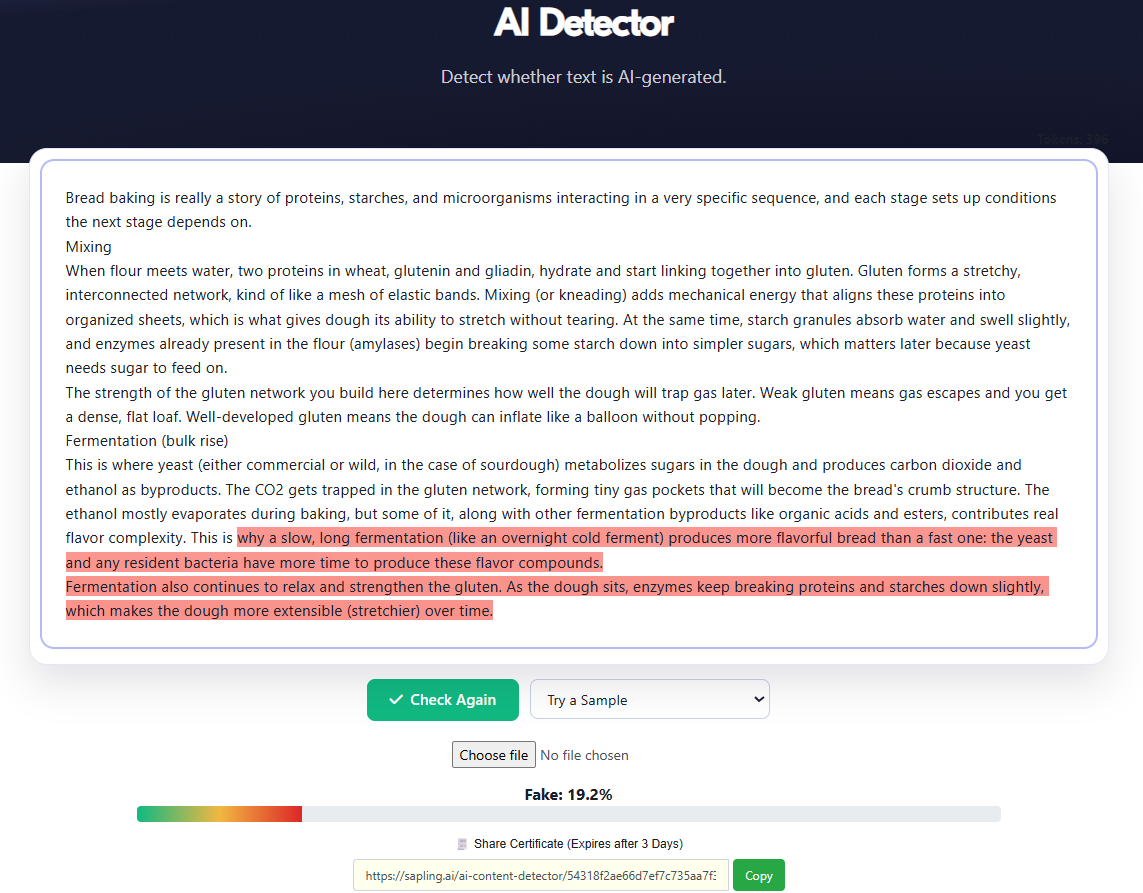
The two Claude samples were the only ones that Sapling couldn’t get right. The ChatGPT and Gemini samples were accurately flagged as fully AI.
If you notice, this is the same pattern the RAID benchmark found, which I talked about in the beginning. Sapling caught every ChatGPT and Gemini sample but missed most of the Claude text, which suggests that its accuracy depends heavily on which AI model wrote the content.
Also notice that the two prompts I used to generate these samples were very simple. I let the AI models write in a typical AI style. Had I engineered the prompt a little, the Sapling AI detector could have performed even worse, particularly against the two Claude samples.
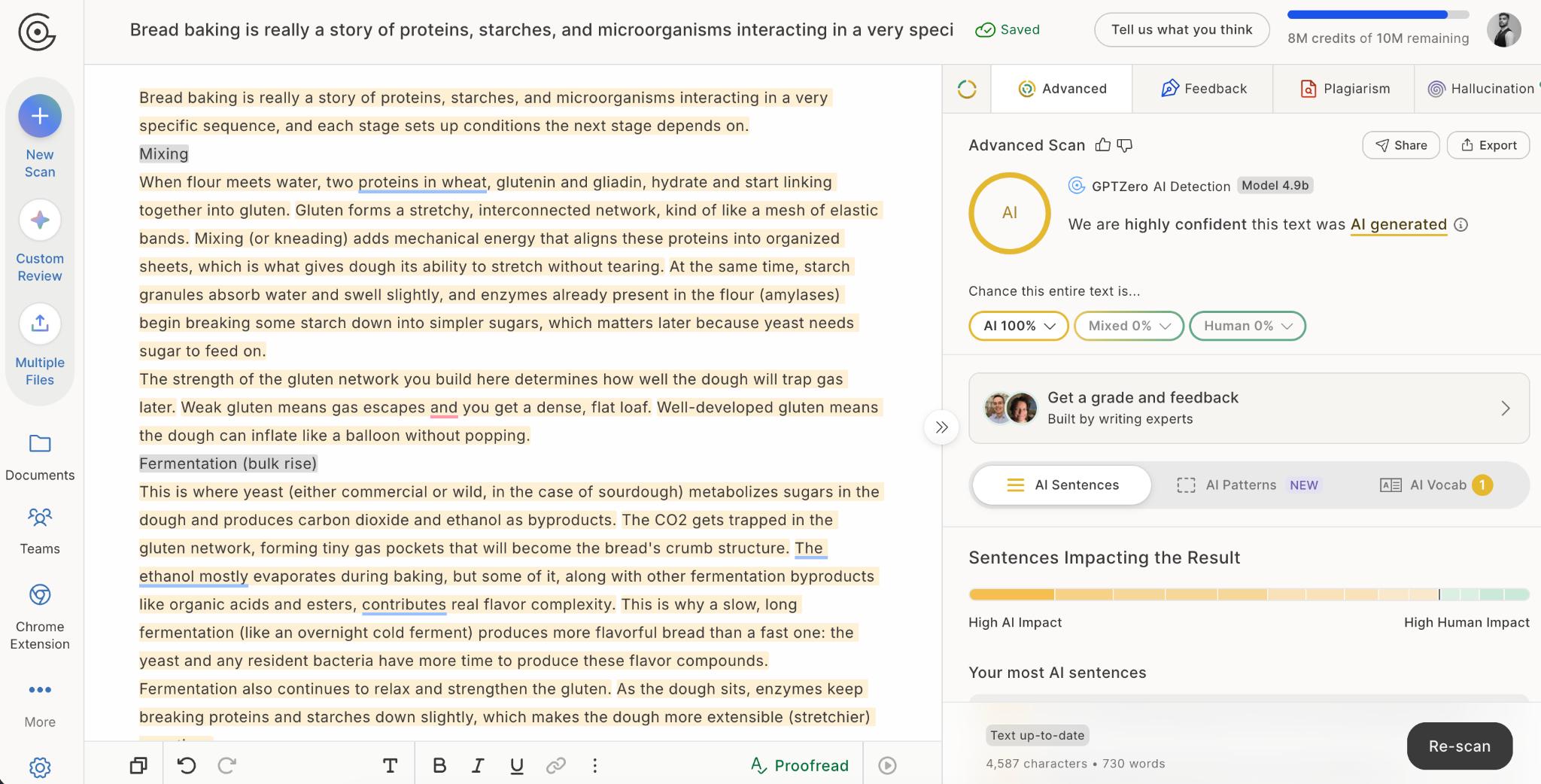
In contrast to Sapling, GPTZero’s AI detector didn’t flinch even slightly and scored all samples as 100% AI.
Sapling AI Detector vs Human-Written Text
These are the AI scores that the 7 human-written samples received from Sapling:
5 of the 7 samples were correctly identified as human with very low AI scores. In other words, they received 98-99%+ human scores.
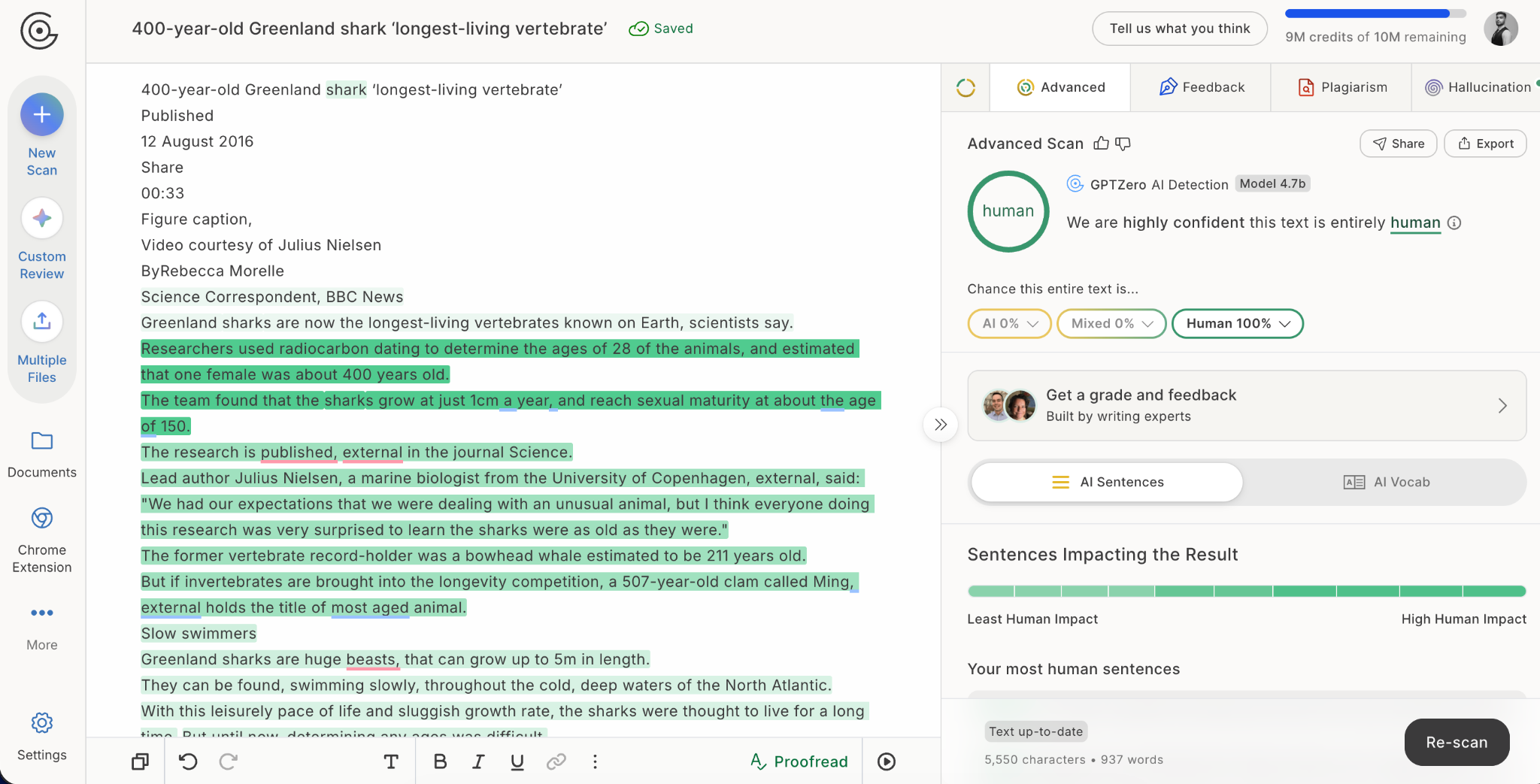
The remaining two samples received relatively high AI scores. These included a BBC article from 2016 and a TED Talk transcript from 2006.
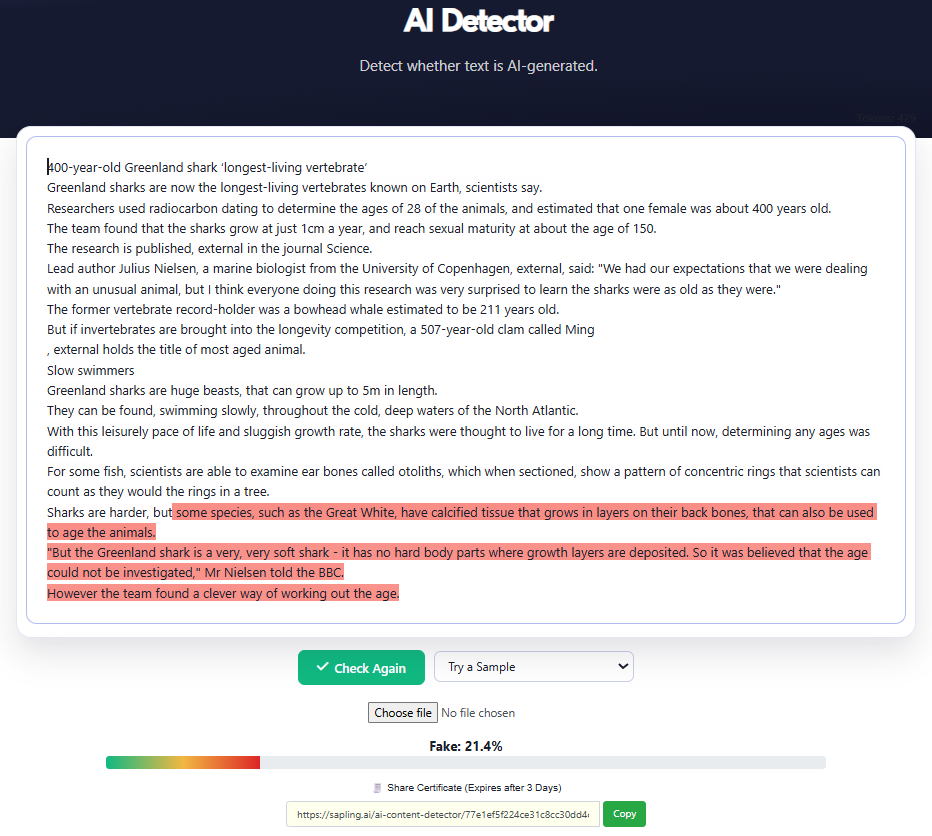
It's unclear why these two received higher AI scores, and the others did not.
Nonetheless, Sapling had a high overall success rate against the human samples. So if you’re checking whether a text is human-written with it, you may occasionally see false positives.
If you want a near-zero positive rate, you can use GPTZero’s AI detector, as it correctly identified all 7 human samples as 100% human in this test.
Sapling AI Detector Pricing
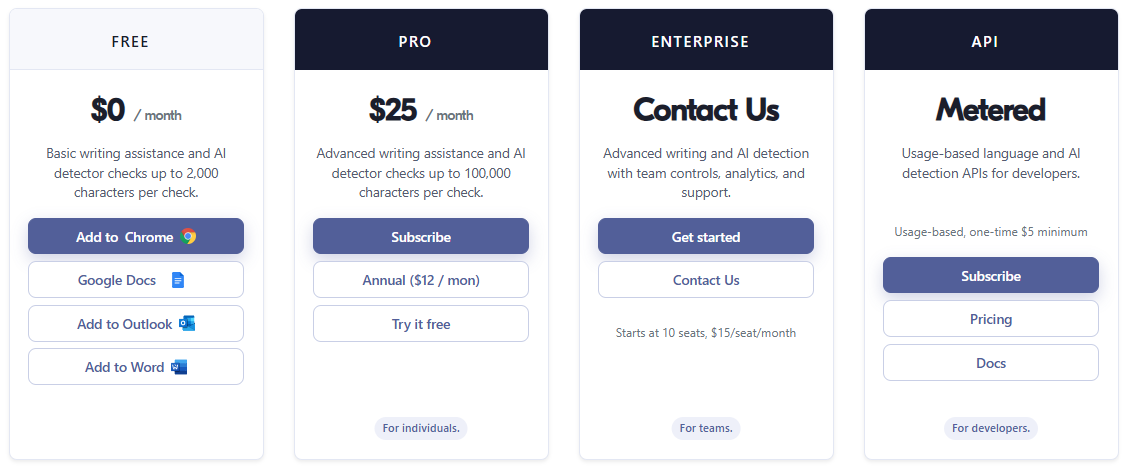
The Sapling AI detector is a free tool.
You can use it for free indefinitely. The only limit is the number of characters allowed per scan.
On the free plan, you can only scan 2,000 characters at a time, which amounts to more or less 350 words. You can even scan a batch of 5 files at once on the free plan.
The starting paid plan that costs $25/month raises the character limit to 100,000 characters/scan, which equals about 15,400 to 20,000 words. This plan also allows you to scan 10 files at once. Some other Sapling features, unrelated to the AI detector, also become available.
If you pay for an entire year, the same plan costs $12/month.
If you have a team of 10 or more members, Sapling also offers an Enterprise plan with custom pricing (starts at 10 seats with $15/seat/month). There’s also a usage-based metered plan for developers (one-time $5 minimum) who want to use Sapling’s AI in their projects.
AI Detection Requires a High-Accuracy Tool like GPTZero
The Sapling AI detector has a good accuracy rate against both AI and human writing. But it can also fail unexpectedly, especially against text generated with Claude. And I didn’t test samples with a mix of AI and human text, which might tell a different story altogether.
Sapling’s interface is also extremely basic. Sapling highlights suspect sentences but doesn't give a separate “mixed” verdict the way GPTZero does.
If you need a more reliable alternative, GPTZero is worth trying.
It has a great accuracy rate against AI, human, and mixed text. It can even detect when a text is a paraphrased version of AI-generated text. I also tested this in my Justdone AI review, where GPTZero correctly identified the text as AI-paraphrased.
GPTZero’s AI detection report is also comprehensive. It detects and reports different patterns, explains why something was flagged as AI or human, and also gives expert feedback on how you can improve the text. On top of everything, you can scan 10K words every month for free.
Try GPTZero for free today and get accurate verdicts on your text samples.