Top 5 Brisk Alternatives That You Should Try in 2026
Finding the Brisk Teaching platform limited and planning to make the switch? Explore the top 5 Brisk alternatives that address Brisk’s limitations.


The Lumina Foundation-Gallup 2026 State of Higher Education study found that around 57% of U.S. college students are using artificial intelligence in their coursework at least weekly. About one in five students uses it on a daily basis.
Similarly, the Student Generative AI Survey 2026 report, published by HEPI and Kortext, found that the proportion of UK students using AI tools like ChatGPT has jumped from 53% to 94% since 2024.
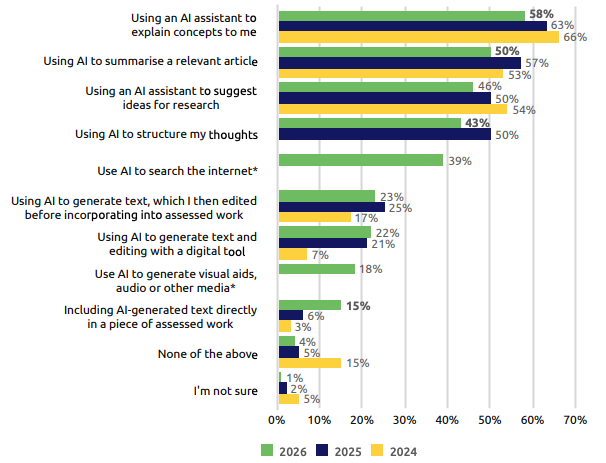
What this means for teachers is that running an AI detection scan on student submissions for grading them has become necessary. And this scan must be run by a highly accurate AI detector because the reputation and grades of students are at stake.
If teachers are using the Brisk Teaching platform to manage their work, accurate AI detection is something they’re lacking.
Then there are other issues with Brisk, such as the platform’s Google lock-in problem. Because it’s a Chrome extension, many schools cannot fully commit to it without making changes to their ecosystem.
In this article, we will introduce you to the top 5 Brisk alternatives. Each of these tools does something better than Brisk. You will learn which of these Brisk alternatives addresses your Brisk pain points the best.
Top 5 Brisk Alternatives in 2026
1. GPTZero
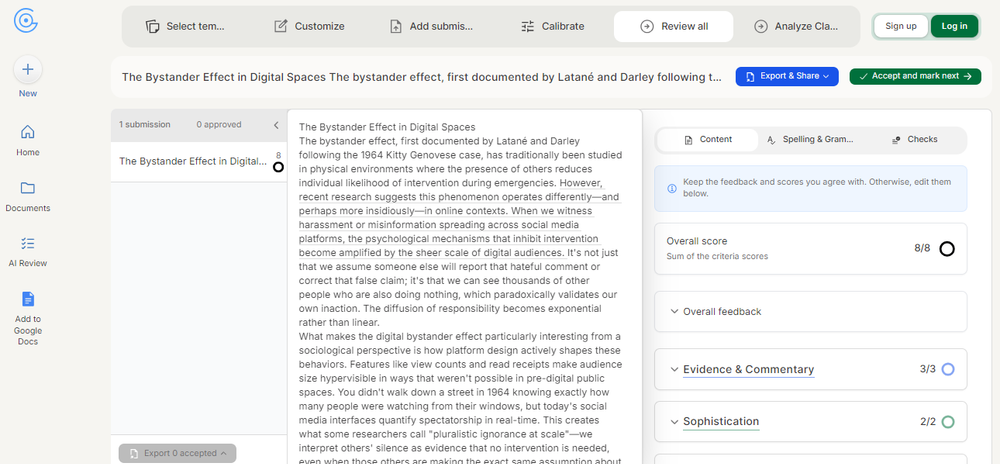
GPTZero is an alternative to some of the key features of Brisk, but it also goes beyond what Brisk offers.
The areas where it directly overlaps with Brisk are writing feedback, grading, and writing replay.
Writing feedback and grading are both part of the teacher's dashboard, where you can upload your assessment criteria as well as student submissions and let the AI grade all of them.
But before GPTZero starts grading submissions, it makes you grade some (at least three) of the submissions by yourself based on your criteria. The platform’s AI observes this and calibrates the assessment criteria accordingly.
If you don’t have a rubric to upload, you can use one from GPTZero’s list of standard grading templates.
You can try GPTZero AI Reviewer for free here.
Then there’s GPTZero’s writing replay tool that exists as a Chrome extension for Google Docs. The tool records the entire editing process of a document. Teachers can later play the recording of each student like a video and check for signs of unnatural editing patterns and other issues.
Key Features
- Built-in AI & plagiarism detector and grammar checker within the grading tool
- The AI grader integrates with Google Classroom, Canvas, Blackboard, and Moodle
- AI grader generates detailed feedback explaining what’s good and what needs improvement
- Scores are also assigned automatically. Both scores and feedback can be edited.
- Overview of your class’s performance, along with suggested actions to improve on weak areas
Pros and Cons
Pricing
GPTZero has a free version, but most features required by teachers are available in paid plans:
- Premium: $12.99/month (when billed annually)
- Professional: $24.99/month (when billed annually)
2. Gradescope
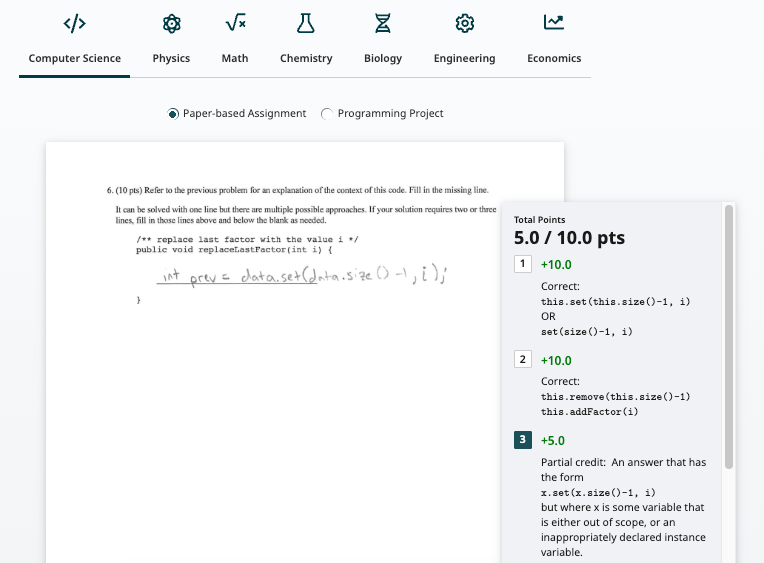
Gradescope is one of the Brisk alternatives primarily because of its AI grader tool. It is owned by Turnitin and specializes in grading in STEM and higher education contexts.
The tool is known for some of its innovative features.
For example, when submissions are uploaded in bulk on Gradescope, the AI clusters similar answers from all those submissions in a group. If the AI fails to add a matching answer to its group, you can drag and drop it manually to the group.
Then you grade one answer from a group, and the grading gets applied to the entire group.
You also have the option to make custom clusters based on some other criterion, if not the similarity of answers.
Turnitin claims instructors can cut grading time by 80% using Gradescope.
Key Features
- Can grade the following types of submissions:
- Exam/quiz
- Homework/problem set
- Bubble sheet
- Programming
- Multi-versioned assignments
- Supports both typed and handwritten
- Both teachers and students can upload the submissions
- Has a mobile app
- Integrates with Canvas, Blackboard, Brightspace, Moodle, Sakai, and other LMS platforms
- Anonymous grading (student name and IDs are hidden) to prevent favoritism
- Regrade requests for dissatisfied students to get their assignments rechecked
- Option for teachers to disable regrade requests
Pros and Cons
Pricing
Gradescope offers two plans (Basic and Institutional), both of which have custom pricing.
3. Snorkl
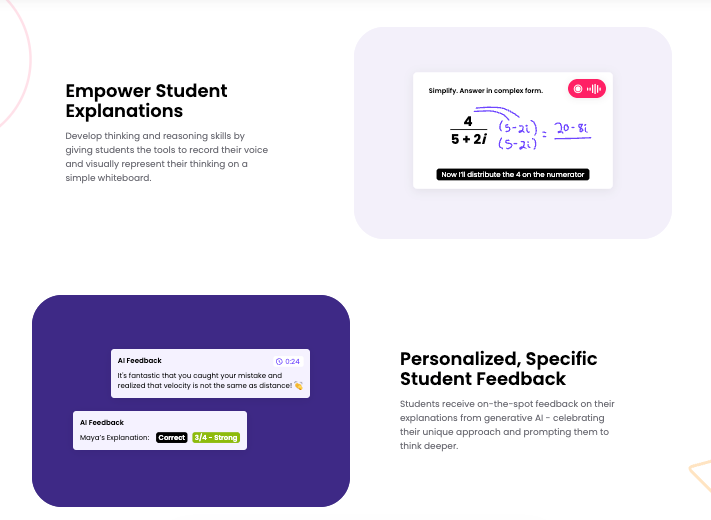
Snorkl is a unique type of Brisk alternative.
It is a platform where students answer questions on their screens or a digital whiteboard, and the AI marks and provides feedback in real-time.
While penning down the answers, students can also speak into their mics and explain their thinking behind what they’re doing.
The AI processes this oral explanation and anything else a student is doing on the screen to offer feedback, which is played as audio to the student.
When the student is doing well, the feedback is appreciative. And when the student needs to be corrected or assisted, the feedback instructs them accordingly.
Because students have to explain their working process aloud, they cannot use shortcuts through Google or AI. The student must work out the correct answer, but also must show the process of getting to that answer.
If students make multiple attempts, teachers can view each attempt and the progression of learning from start to finish.
Key Features
- Supports over 40 languages
- Processes typed, drawn, and spoken responses
- Student responses can be grouped and sorted
- Analytics dashboards that show class weaknesses, misconceptions, strengths, etc
- Library of standards-aligned activity materials from leading curriculum providers
- Allows multiple teachers to manage a class
- Students can comment on peer responses using screenshots, text, or video
Pros and Cons
Pricing
Premium is only for schools and districts and has a custom price.
4. Class Companion
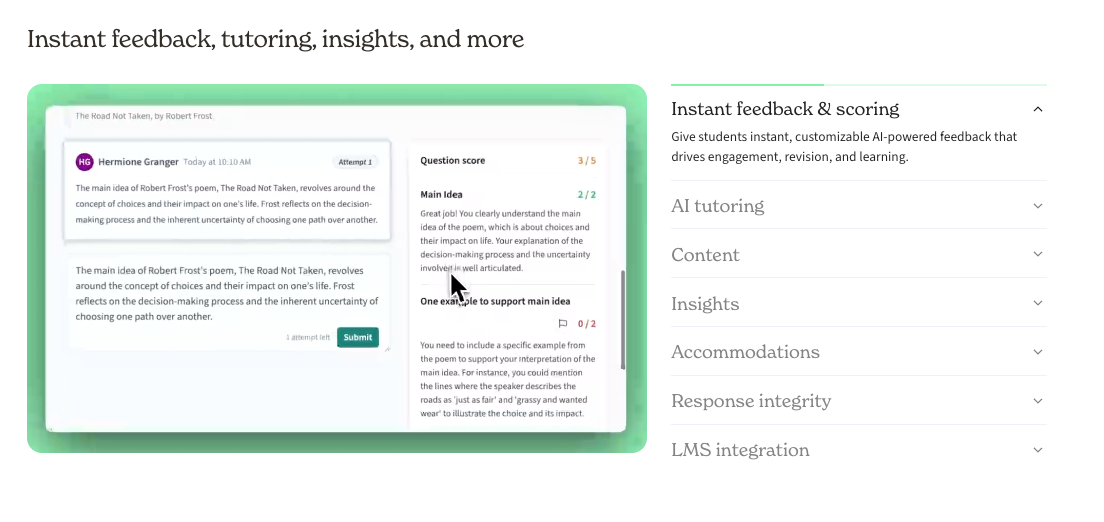
Class Companion is a first-pass grader for written assignments only.
The assignment types it supports include short answers, essays, and multiple choice.
It’s up to teachers whether they want to use an assignment from the platform’s own assignment library or build one using the platform’s AI.
Another option is to just upload the assignment file or upload its text. The same goes for rubrics. You can either choose a rubric from the library, upload your own, or build it using AI.
Class Companion also provides the functionality to produce assignments and rubrics from scratch.
Students then submit their answers, and Class Companion instantly grades them and provides feedback by evaluating them against the respective rubric.
The score and feedback are both tentative, meaning the teacher can always override them with a personalized version of their own.
If students don’t get the answers correct on the first attempt, they can attempt the assignment again. They can submit as many attempts as possible before deciding to turn them in.
Key Features
- Supports text-based assignment types only, namely:
- Short answer
- Essays
- Multiple choice
- Assignments and rubrics can be produced from scratch or using AI. You can also use pre-made assignments from the library or upload your own assignment files.
- The library of assignments covers a diverse range of subjects
- Supports multiple attempts for an assignment
- Allows importing the following from Google Classroom, Clever, Schoology, or Canvas:
- Classes
- Students
- Assignments
- Grades
- Features to detect cheating from the web or other students
- Accessibility features to accommodate students of all abilities (reading level adjustment, text-to-speech, etc.)
Pros and Cons
Pricing
Premium is only for schools and districts and requires scheduling a demo.
5. Magic School AI
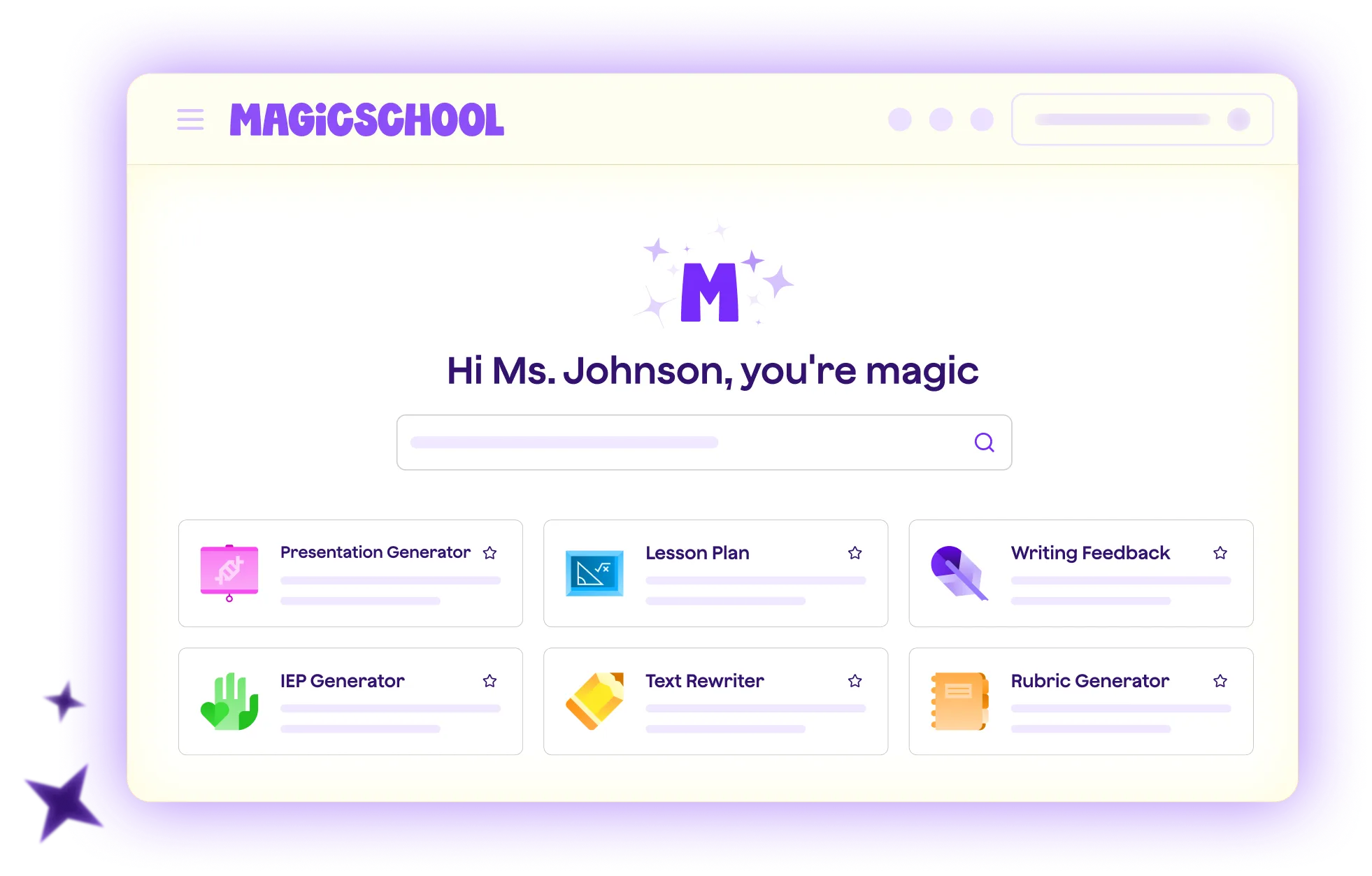
Magic School AI is, without a doubt, the most comprehensive Brisk alternative on this list. That’s because the platform covers nearly all of the same ground as Brisk and then some.
For example, Brisk Teaching offers 30+ AI tools for teachers. Magic School AI, on the other hand, offers 80+ tools for teachers, covering areas such as:
- Lesson planning
- Assessment creation
- Differentiated instruction
- IEP suggestions
- Communication templates
- Behavior intervention plans
- Professional development resources
Then there are 50+ AI literacy-building tools for students as well. Students access these tools in Rooms that teachers create for them.
On top of that, like Brisk, Magic School integrates with Google Docs, Google Classroom, Canvas, and some other similar platforms that teachers already use.
There are also tools for creating assignments and quizzes, and assigning them feedback based on predefined criteria. However, these tools aren’t as advanced as the rest of the tools on our list.
Key Features
- A vast library of tools for teachers and students
- Raina, a FERPA-compliant AI Coach to guide teachers round-the-clock
- Integration with Google Docs, Google Classroom, Canvas, and more
- Generates accommodations for IEPs, BIPs, and 504 plans, along with scaffolds like sentence starters
- Class, student, and subject level insights
- Students can ask AI for further clarification about their grades
- Real-time insights on the usage of tools by students
Pros and Cons
Pricing
There’s a free plan of Magic School AI, then there are two paid plans:
- Plus (for educators): $12.99/month
- Enterprise: custom pricing
Preserve What's Human With GPTZero
All Brisk alternatives have a fair share of strengths. However, one thing is lacking in all of them, excluding GPTZero. High-accuracy AI detection. Either they don’t offer a tool for that entirely. Or they do, but their performance is weak.
GPTZero consistently ranks among the most accurate AI detectors, with one of the lowest false-positive rates.
Both independent and company benchmarks have proven the accuracy of GPTZero. You can even feed it heavily paraphrased AI text, and it’ll be able to tell that the original text was AI-written.
You can see this for yourself. Try the AI detector with assignment samples for free.
FAQs
What is the best alternative to Brisk Teaching?
The best alternative to Brisk Teaching is the one that does its primary function in a better way. Brisk’s primary function is feedback and grading on student submissions. But there are better tools for this in the market. GPTZero seems to be the best fit for this task due to its advanced grading features and industry-leading AI detection.
Which alternative is closest to Brisk Teaching in terms of features?
In terms of everything that Brisk Teaching does, the closest alternative is Magic School AI. It has 80+ tools for teachers and 50+ tools for students. Many of these tools overlap with what Brisk offers.
Is GPTZero accurate enough to use as evidence against a student?
GPTZero has been rigorously tested by independent benchmarks many times, and it has always come out on top. We have also done our fair share of testing to make sure no student gets accused wrongly. While GPTZero is accurate enough, the results should not be used to punish students. You should use our AI detector in combination with our Writing Replay tool for a more holistic assessment.