How to Write a Professional Email: A Step-by-Step Guide
Learn how to write professional emails that are clear, concise, respectful, and effective. This guide covers email etiquette, formatting, tone, structure, proofreading, and practical steps for communicating confidently in academic and workplace settings.


Emailing is the primary form of correspondence in most professional and academic settings. It’s important to develop an email style that allows you to express yourself clearly and respectfully. “Email etiquette” may seem like an antiquated idea, but it’s a cornerstone of effective communication online.
But what makes an email professional? What kinds of words are appropriate to use, and which will raise eyebrows? How can you avoid sounding “abrasive” or “accidentally offending” someone without sounding “too formal” or like you’re “at a fancy British tea party”?
This guide will explain what a professional email is and when you should write one. Master the main features of professional correspondence with step-by-step instructions and learn how to compose and polish your email to perfection.
What is a Professional Email?
A professional email is a clear, concise, and properly formatted tool of communication used in the workplace. It uses formal language and formal features like proper salutations and polite closing phrases, and its contents are well-organized and clearly identified in the subject line.
Key Elements of a Professional Email
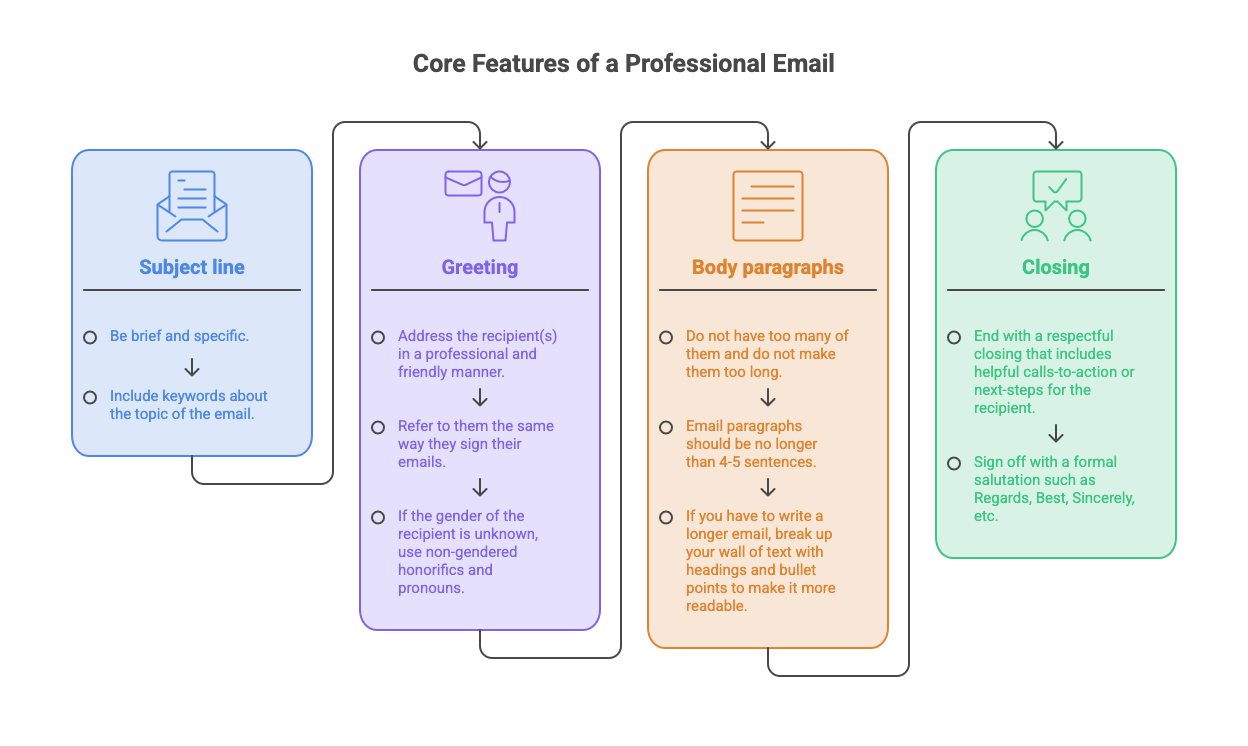
These are the core features of a professional email:
- Subject line – be brief and specific. Include keywords about the topic of the email.
- Greeting – address the recipient(s) in a professional and friendly manner. Refer to them the same way they sign their emails. If the gender of the recipient is unknown, use non-gendered honorifics and pronouns.
- Body paragraphs – do not have too many of them and do not make them too long. Email paragraphs should be no longer than 4-5 sentences.
- Headings – if you have to write a longer email, break up your wall of text with headings and bullet points to make it more readable.
- Closing – end with a respectful closing that includes helpful calls-to-action or next steps for the recipient. Sign off with a formal salutation such as Regards, Best, Sincerely, etc.
When to Send a Professional Email
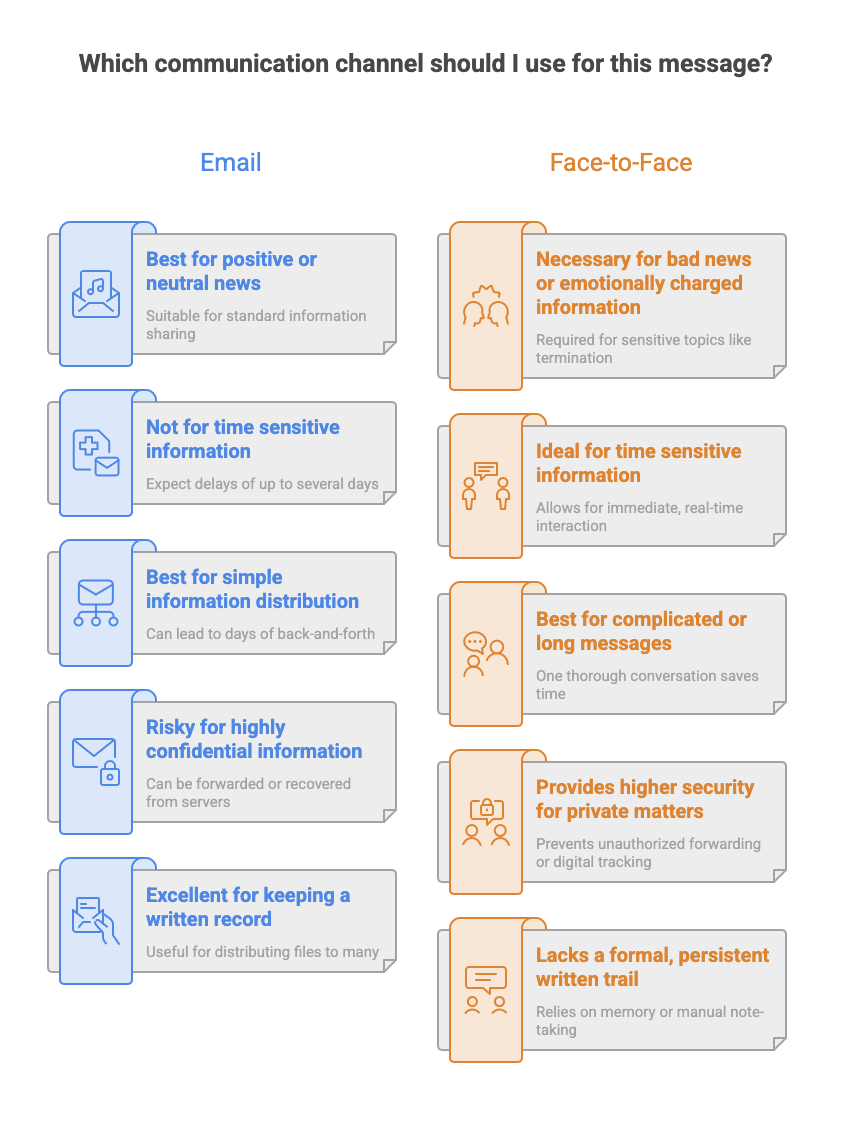
Email is not always the most appropriate form of communication. Always consider the nature of the message.
- Positive or neutral news and the sharing of information are suitable for email. Bad news or emotionally charged information is often better conveyed face-to-face or through video conferencing. For example, terminating someone’s employment should not be done over email.
- Time-sensitive information should be shared through other methods of communication, like a phone call or face-to-face. Although sending an email is instantaneous, you should never expect an instantaneous response. For most people, email correspondence happens during business hours, and it may take up to several days for someone to reply unless they’ve promised otherwise.
- Long messages that are complicated or will require additional discussion are often best to save for face-to-face conversations. One thorough conversation can save days of back-and-forth emailing.
- Highly confidential information may not be good to share over email. Remember that anything you email can be forwarded to other parties without your knowledge and recovered from servers even if you’ve deleted the email; never assume that your emails are private.
- Good reasons to use email for your correspondence include: sending electronic files; distributing information to a large number of people; and keeping a written record of communication.
A Step-by-Step Guide to Writing a Professional Email
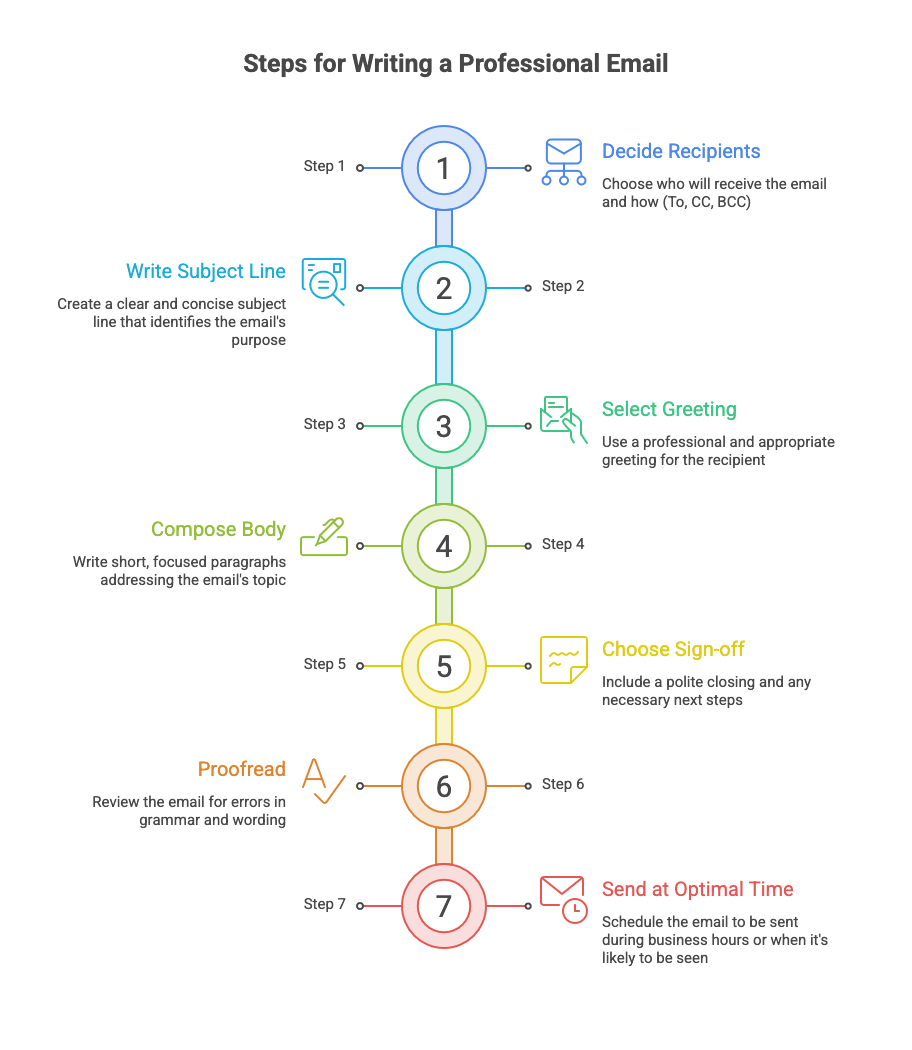
Decide who will receive your email and how
While the most straightforward option is to send an email to a single recipient, you may need to distribute the email among multiple recipients. Sometimes this requires “copying” someone on the email, which will send them the email without designating them as the recipient. This is typically intended to provide a copy of correspondence to someone who is not expected to reply to it or whose email address should not be distributed.
There are two ways to copy someone on an email:
- Carbon Copy (CC): This method is visible to all recipients, who will see the email addresses of the people copied in the email. In professional settings, this is often used to copy someone’s supervisor to keep them apprised of your communications.
- Blind Carbon Copy (BCC): This method of copying hides the email addresses of recipients. This is highly useful in situations where you don’t want to distribute people’s email addresses to the entire group.
Write a subject line that clearly identifies the purpose of the email
If your subject line is too vague, your email may go unanswered because it’s been ignored or sent to a junk folder. Keep it brief, but be specific. Rather than the subject line “Meeting”, include keywords that indicate the email’s purpose, like “Budgetary Meeting Request”.
If you are emailing a professor, include the name (or course code) of the course you’re taking with them, as most professors teach multiple courses in a semester and will need more specific identifying information than “Essay Help” or “Question About the Syllabus”.
Select an appropriate greeting
The greeting should be “short, sweet, and professional.” You can indicate the time of day (“Good morning” or “Good afternoon”) or simply begin with “Hi” or “Hello”. Be sure to avoid slang or overly familiar language.
If you don’t know the name of the person you’re contacting, or if you’re emailing a diverse group of people, use a generic, polite address such as “To Whom It May Concern” or, less formally, “Hello, all”.
Compose the body paragraphs of the email
After a brief greeting, get right down to addressing the topic and purpose of the email. Keep your paragraphs as short as possible, and do not address too many topics at once.
The order you present information in will depend on whether the recipient is already informed about the topic of the email or not. If your reader already knows about or is supportive of the topic you’re emailing about, use this order:
- Main point/decision/request
- Background information or context (if required)
- Closing paragraph (summary, action items, polite conclusion)
If the recipient of the email is not familiar with or supportive of the information you’re delivering, you should structure your email to better meet their needs. Provide the rationale and background before the reader encounters the main message, in this order:
- Background or context required
- Main point/decision/request
- Closing paragraph
Select an appropriate sign-off
Be sure to thank the recipient for their time and, if applicable, refer to next steps they can take. For example, tell them you’re looking forward to receiving their response or that you will be sure to process their application as soon as it’s sent in.
Include any links or documents that should be provided. Always check that you have attached the files you want to send.
Proofread
Re-read your messages before you click Send. Catch grammatical errors and clarify wording to show professionalism and attention to detail. It can even help to read the email aloud to identify and fix awkward phrasing. Take a quick moment to run your email through a grammar checker.
Send at an optimal time
You can set a specific time for your email to be sent. This is useful if you work unconventional hours and want your email to appear in an inbox during business hours or when you know that inbox will be checked.
The same is true of selecting an appropriate day to send your email; if you email on a Friday night, that inbox may not be checked until Monday morning, at which point a number of other emails that arrived over the weekend may have pushed your email to the bottom of the list. It can be strategic to delay sending the email until Monday morning.
Examples
Learn by seeing how others do it. Here are some useful examples of professional emails provided by authoritative sources:
- Here are 5 examples of business emails from the job site Indeed.com.
- For a detailed analysis, check out MIT’s annotated comparison of good and bad emails.
- Rutgers University provides several different templates to suit various emailing purposes.