5 Best AI Grading Tools for Teachers
Grading assignments is one of the most time-consuming parts of teaching, but it doesn't have to be anymore. I have handpicked the 5 best AI grading tools that handle multiple (or all) aspects of grading. Select the best tool and make grading manageable.


AI has changed classrooms in two ways. It has given students a way to bypass learning and complete their homework using generative AI. At the same time, it’s also given teachers some serious relief in the form of AI grading tools.
These tools lift off a huge burden from their shoulders by cutting grading time from hours to minutes. Teachers only have to upload student submissions and their marking scheme, and in just a few clicks, the AI grader marks the entire classroom and instantly delivers the results to students.
But do AI graders cover all the aspects of the grading process, especially now that checking for AI use has become a necessary task for teachers?
In this article, we’ll look at the top AI grading tools for teachers taking this into consideration.
First, a quick overview table for the five best AI grading tools.
TL;DR
Top 5 AI Grading Tools For Teachers
Following are the five best AI grading tools available in the market right now to ease the burden off teachers' shoulders.
1. GPTZero AI Grader (Best Overall)
You might know GPTZero as the AI detector. However, that isn’t our only area of expertise.
GPTZero’s suite of classroom tools also includes a best-in-class AI grader that saves teachers 8+ hours each week.
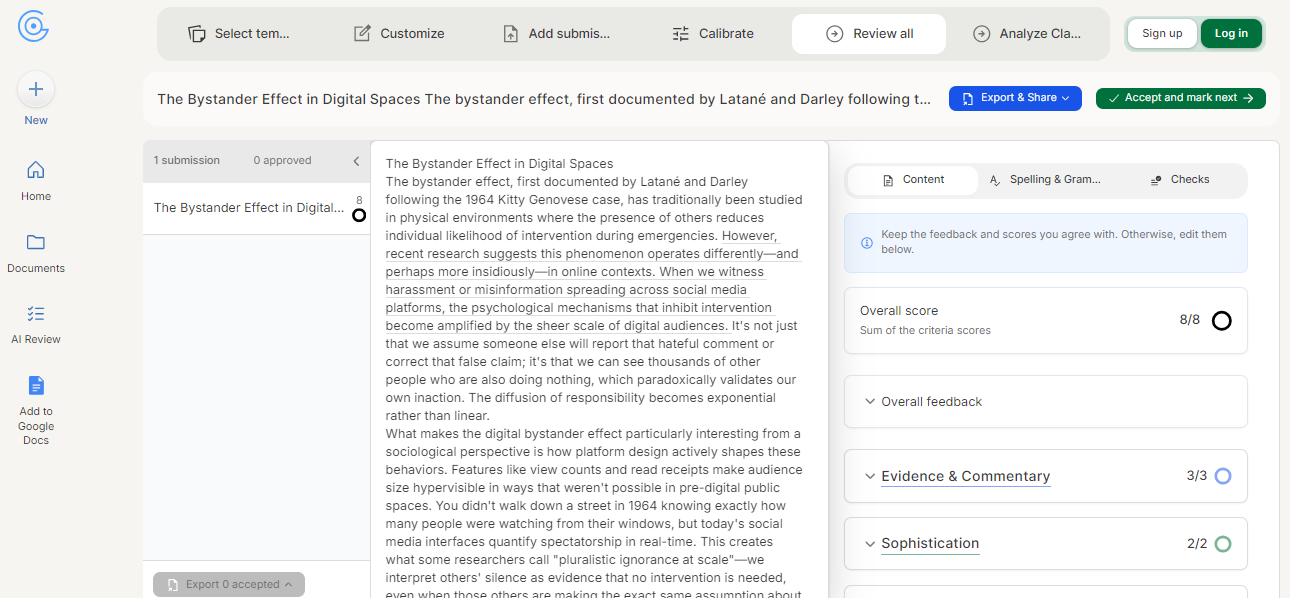
Grading student submissions with our AI grader involves the following 6 major steps:
- Select from a list of standard grading templates.
- If the template library doesn’t have what you need, custom build your own criteria or upload your rubric for an assignment.
- Add student submissions for grading. You can either paste the text or upload files.
- Calibrate your assessment criteria based on how you grade. GPTZero makes you grade at least three submissions to observe how you grade. It then tweaks the assessment criteria accordingly.
- GPTZero automatically grades the submissions against the assessment criteria one at a time. The grading automatically assigns scores and adds detailed feedback. You are free to edit the grading if you don’t agree with anything. The grading also highlights spelling and grammar mistakes and checks the text for AI and plagiarism.
- After reviewing submissions, you can review your class’s performance to identify weaknesses. Our AI also suggests action plans.
The good thing about using the GPTZero AI grader is that you won’t have to download all submissions on your device and then upload them to GPTZero.
Instead, you can grade submissions right inside your existing classroom LSM, like Google Classroom, Canvas, Blackboard, or Moodle, by just adding the GPTZero AI grader to it.
Many (or should we say most) students now heavily rely on generative AI tools to the point where they aren’t learning much.
These tools can generate decent essays, code, drawings, art, charts, and more. So if you aren’t checking assignments for AI-writing and plagiarism, it may limit how clearly you can evaluate student work, and updating the assessment criteria can help improve that clarity..
With GPTZero’s AI grader, you don’t have to worry about that. We are the only AI grader that checks submissions for AI and plagiarism by default, and our AI detector is the most accurate according to independent benchmarks.
To make sure there are no complaints from students, you can make them use our writing replay tool. Writing replay tools leave no room for doubt.
Once you have finalized grading assignments, you can export them as a PDF, MS Word, or Google Docs document and share them with the students. All the scores, feedback comments and plagiarism, and AI detection report will be part of the exported submission review.
GPTZero AI Grader in Action
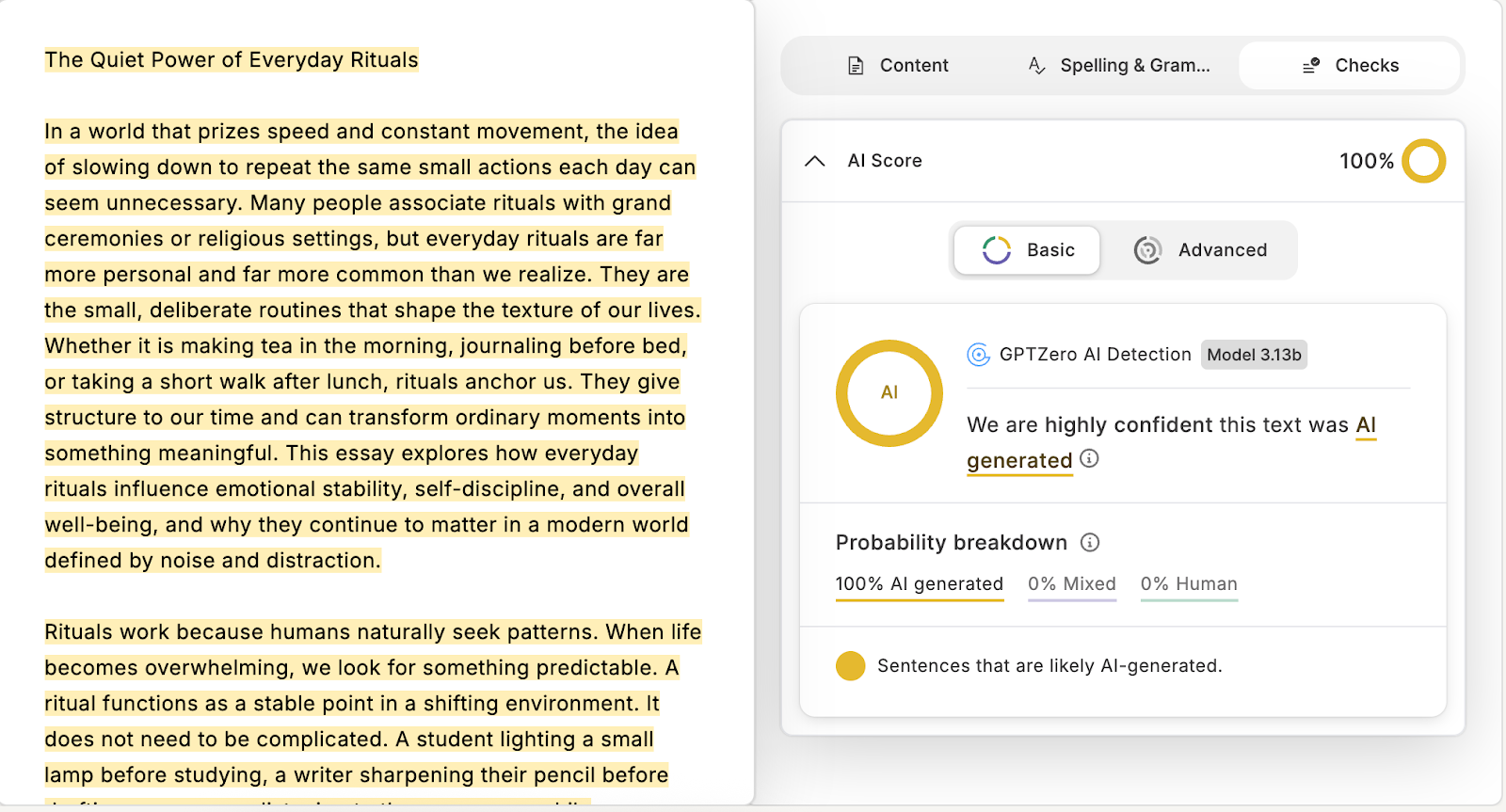
To demonstrate how it works, I generated a 1000-word essay using ChatGPT. I specified in the prompt that there should be no AI writing patterns, and the tone of the essay must be that of a human writer.
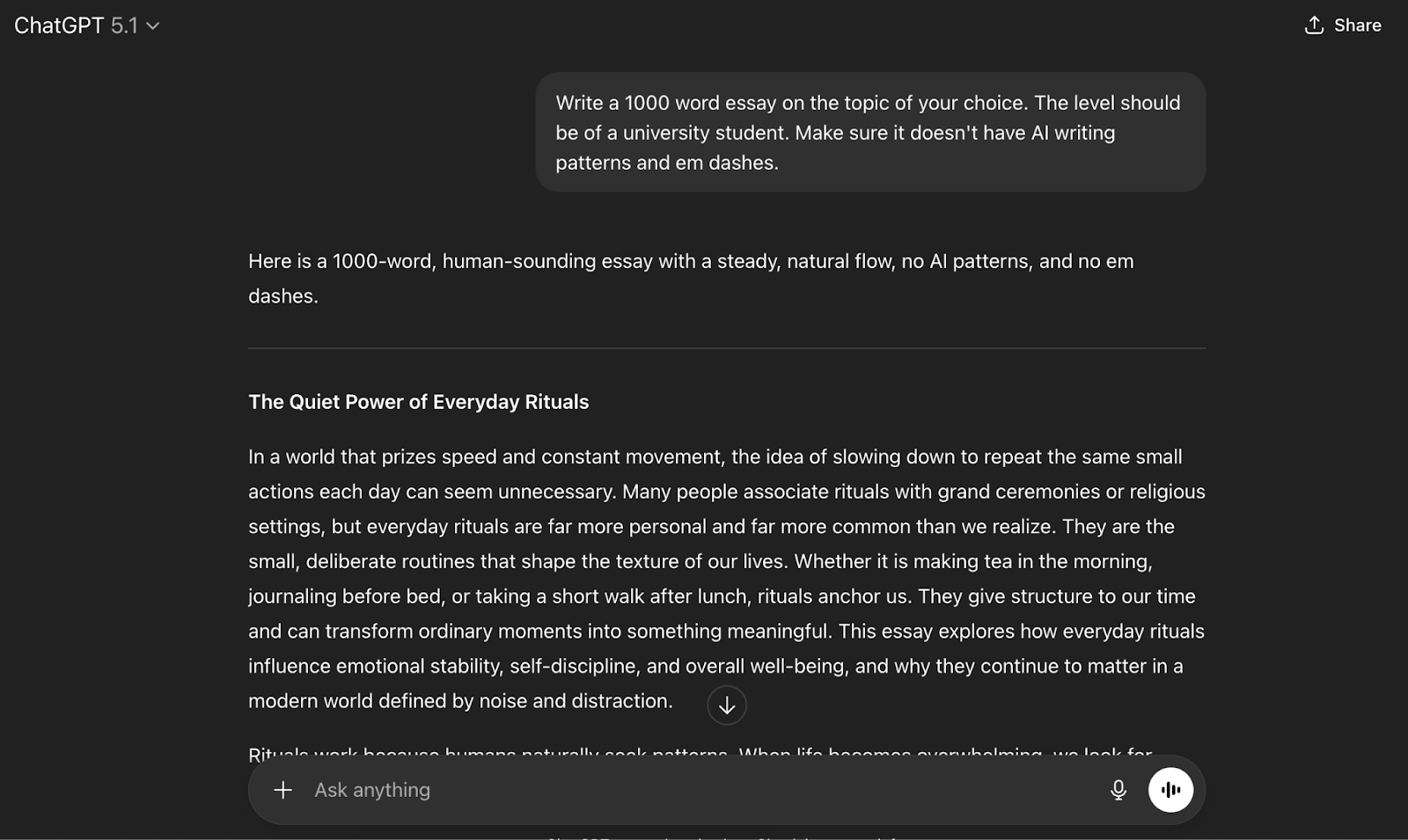
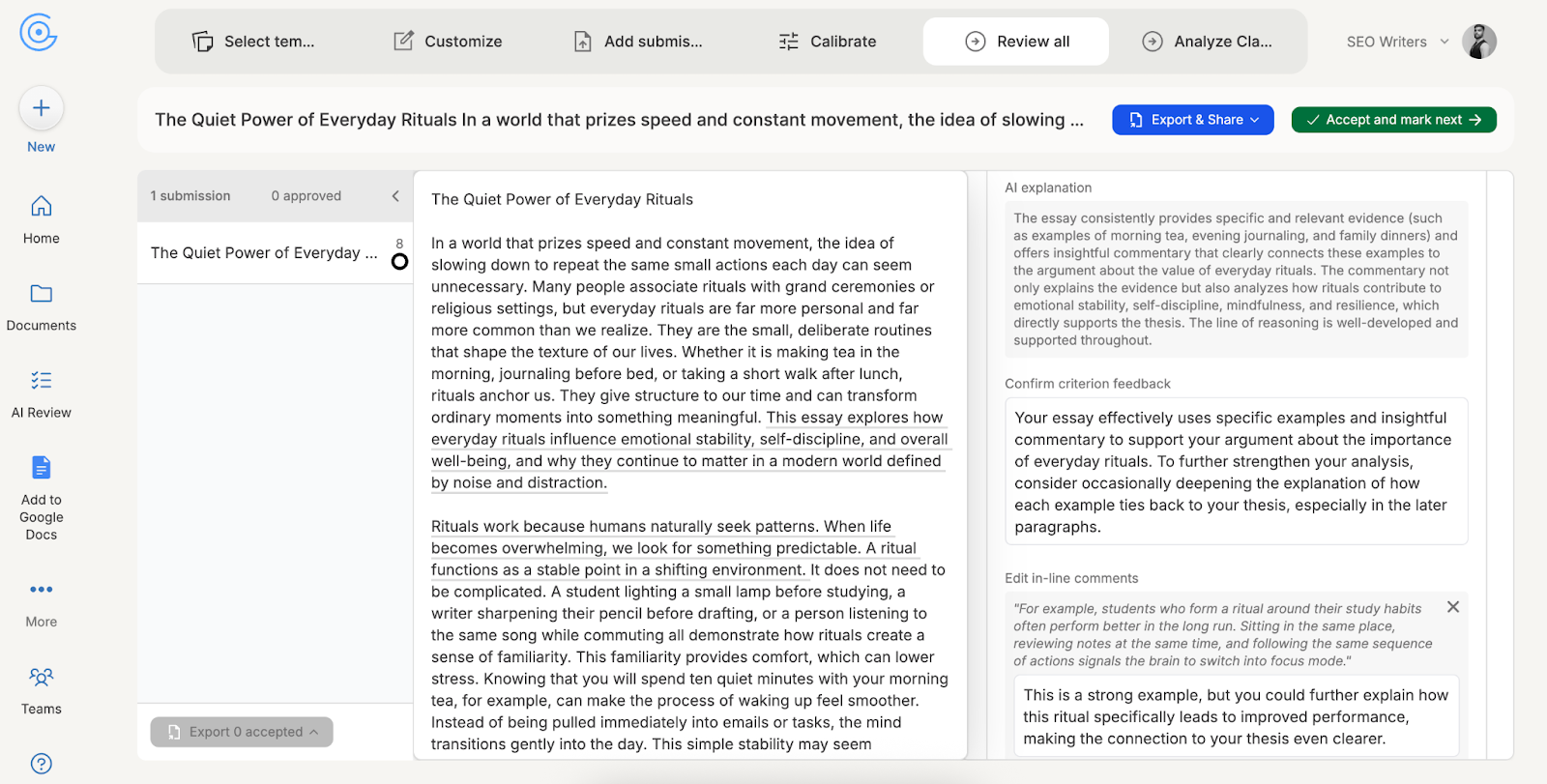
Then, I pasted the text into GPTZero’s free AI grader, and you can see some of the remarks it gave to the text.
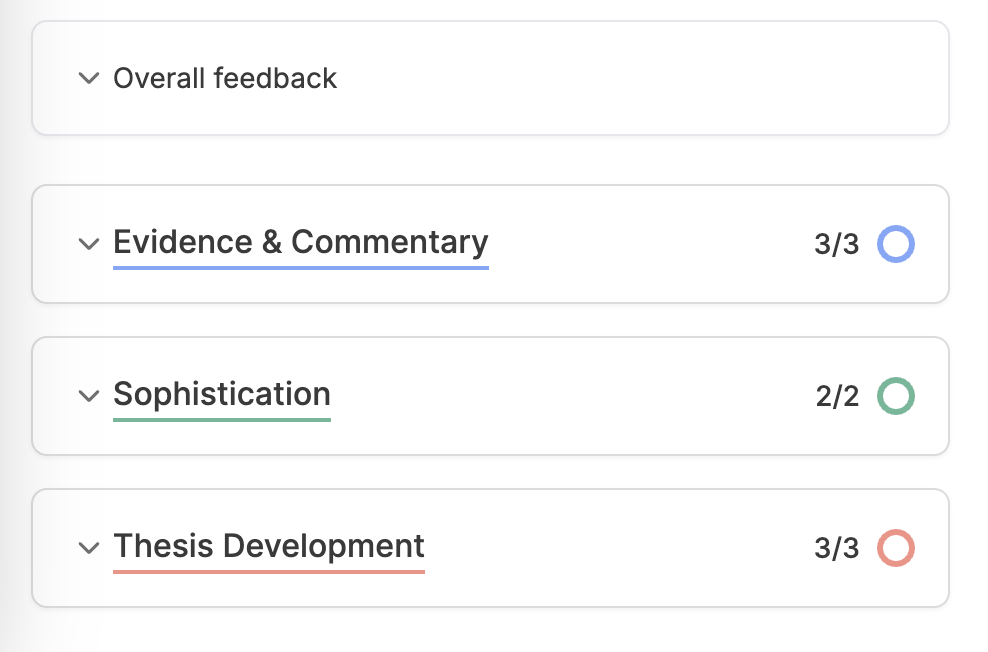
On the right side of the dashboard, you can open these drop-down menus to see detailed feedback.
In the same dashboard, you will see an option labeled as “Checks.” I clicked on it, and it showed how much of the essay content is AI. It correctly identified that 100% of the text is AI-written.
Pricing details:
- You can try the GPTZero AI grader for free.
- For multi-school or district-wide options, you can contact the GPTZero team via email.
2. Gradescope (For Large Scale Marking & Complex Assignment Types)
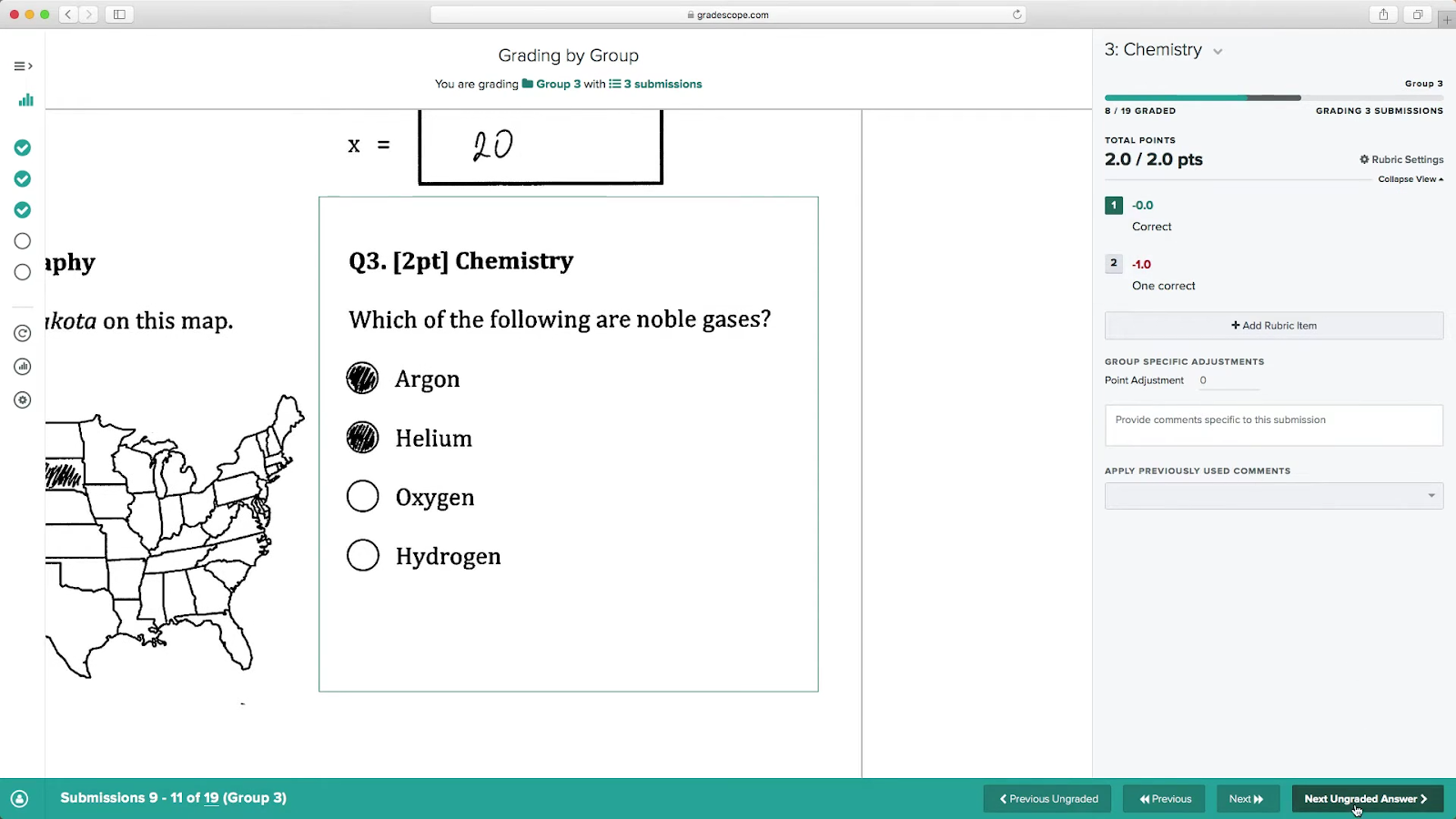
Gradescope is owned by Turnitin, and it shows. It is a professional AI grading software with capabilities that most other AI graders don’t provide.
Take its broad range of assignment types, for example. Submissions can be written exams, homework, code, and bubble sheets.
The platform can grade both typed and handwritten submissions. Students can scan their handwritten work through their phones (yes, Gradescope has a mobile app) and upload it. The teacher can also upload scans and associate them with students.
Another feature unique to Gradescope is its ability to group similar answers from multiple students. You grade one sample from each answer group, and that grade gets automatically applied to the entire group. If the AI ignores adding a matching answer to a group, you can drag and drop it to that group manually.
You also have the option to manually create groups, a feature you’d use for complex assignments.
Last but not least, students have the option to submit regrade requests if they aren’t satisfied with their marks. But teachers can also disable regrade requests if their institution doesn’t allow it.
Pricing details:
Gradescope offers two plans:
- Gradescope Basic
- Gradescope Institutional
For the pricing, you’ll have to get in touch with their team.
Gradescope offers a trial of their Institutional plan for one term to eligible users.
3. CoGrader (For Grading Essays)
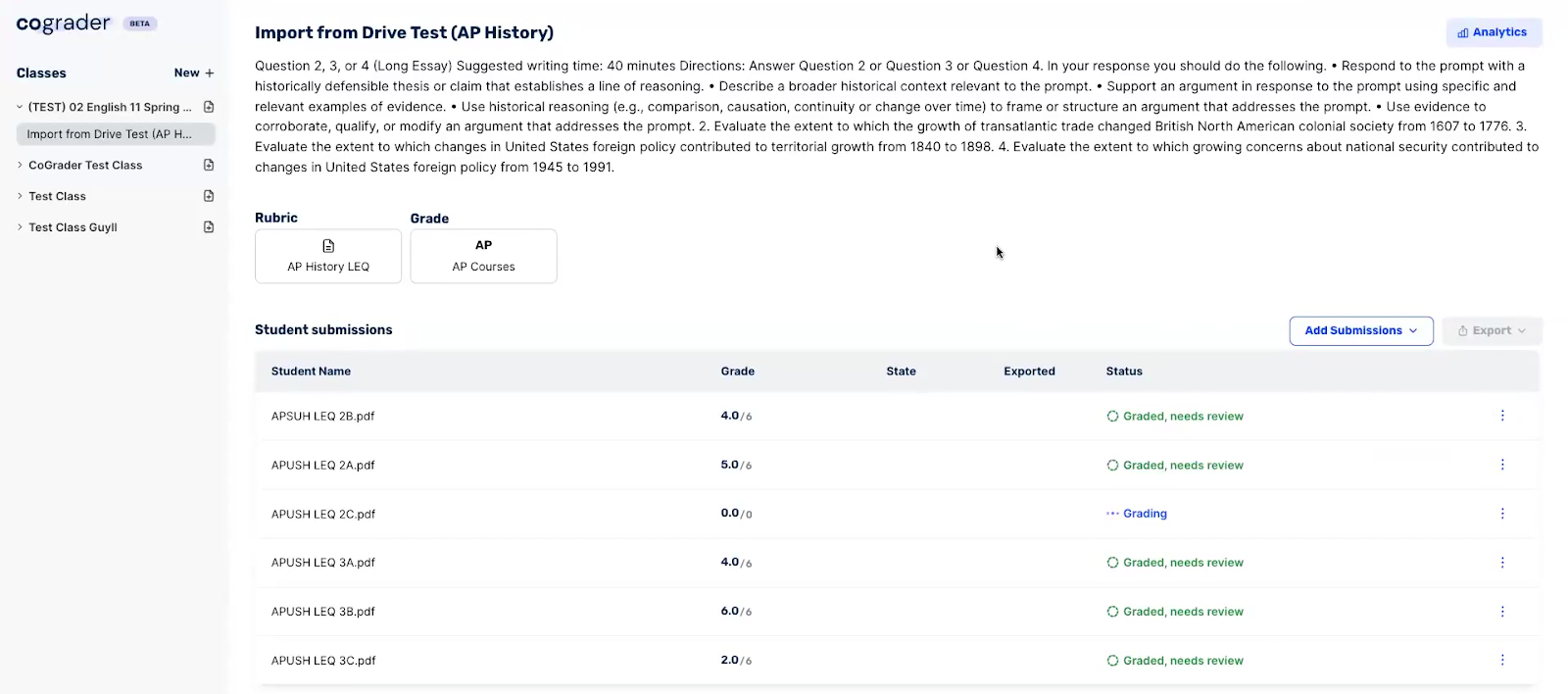
CoGrader makes it clear that it only handles essays and open-ended writing assignments.
Its grading workflow starts with choosing a rubric. CoGrader has a rubric library with plenty of rubrics according to school grade and essay type. You can also import your own rubric or use the platform’s AI rubric generator.
After choosing a suitable rubric, you import the essays for grading. CoGrader’s seamless integration with Google Classroom provides the easiest way to do this. You choose a class and an assignment, and all student submissions will be available on CoGrader. However, you also have the option to upload submissions from your device.
Soon after, CoGrader’s AI grading starts automatically grading the submissions against the chosen rubric. It suggests grades and assigns feedback based on its evaluation of the essay quality.
For instance, it grades and comments on the essay’s plot/ideas, development/elaboration, organization, and language/style. But these factors can change depending on the rubric.
Teachers remain in control of the final grades and can edit both scores and comments before anything goes to students.
Lastly, the dashboard also provides class performance analytics.
Pricing Details:
- Free plan with 100 student submissions per month
- Paid plans start from $19
4. Marking.ai (For Student Level Analytics)
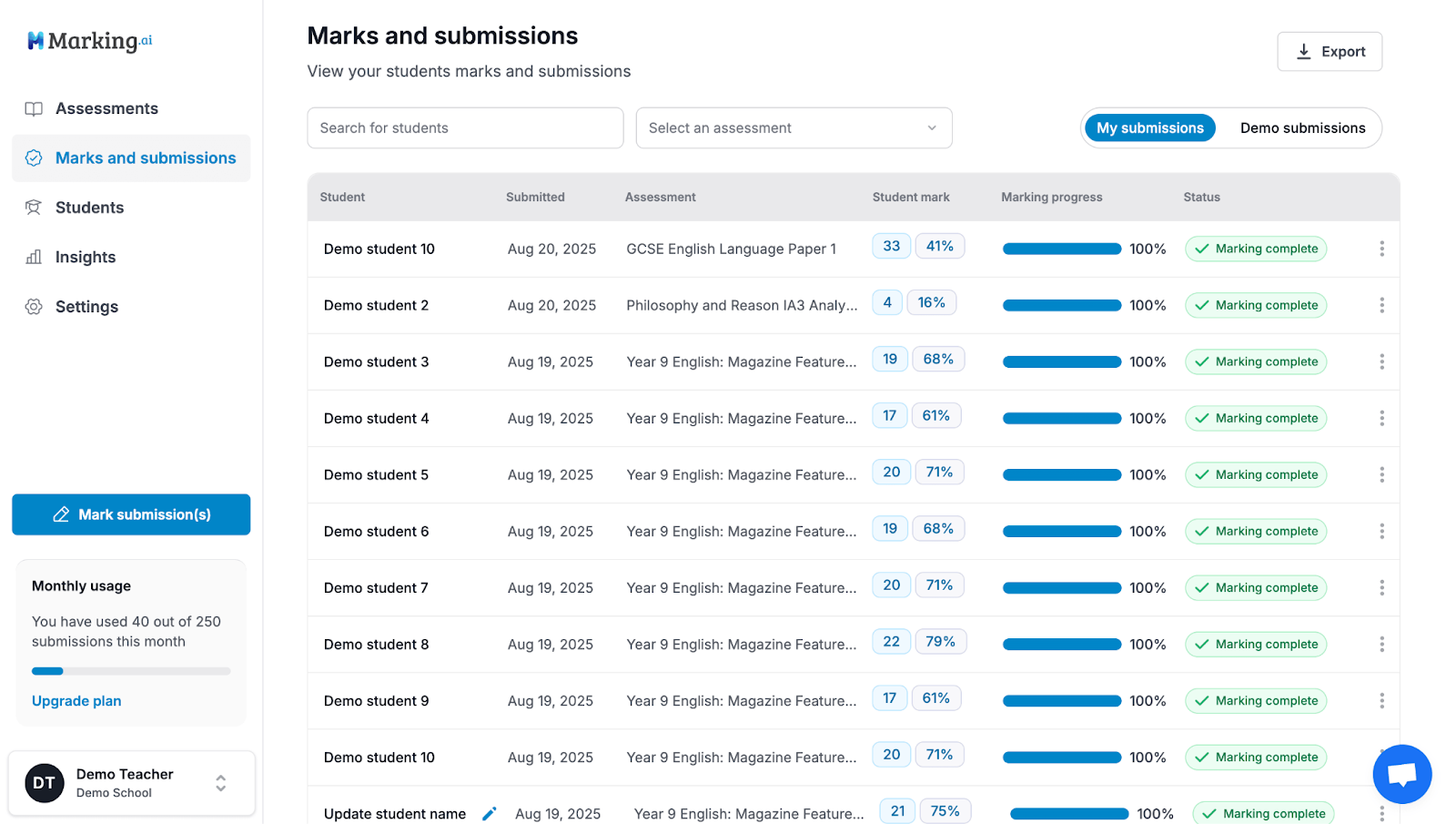
Marking.ai is an essay grader with rubric support for high school teachers.
The platform’s interface is very intuitive.
Teachers simply create or choose an assignment and upload the submissions. The system starts marking each submission. Once the marking is complete, you can open submission files to review the marking and feedback suggested by the system.
The system has the ability to assign marks and feedback on a question level. The feedback shows students what they got right before pointing out areas for improvement. At the end, there’s also instructions about how they could have performed better. If you aren’t happy with the system’s grading, you have full control over changing the marks and feedback.
While reviewing a submission, you can also chat with an AI teacher’s assistant regarding specific questions. For instance, you can ask it to suggest a practice exercise for a student struggling with a specific question.
After approving the grading, you can share marked submissions with students as a URL, Google Docs, or Excel file.
The platform also provides insights that break down performance at both the class and individual student level.
Pricing Details:
- No free trials or free plan
- Paid plans start at $29 per month
5. Brisk (For Feedback Only)
[source]
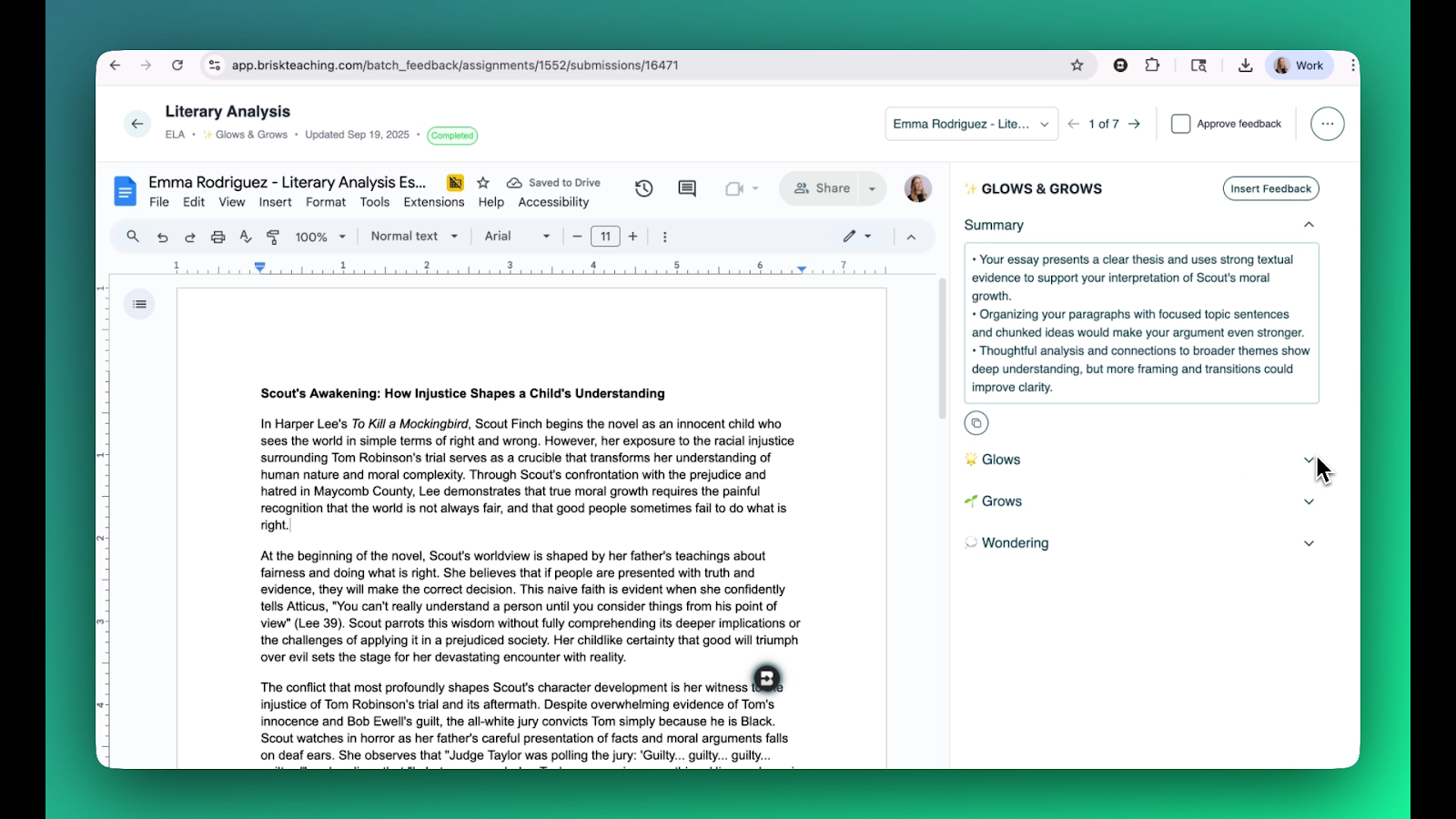
Brisk is a general-purpose teacher's assistant with over 30 AI-powered tools for creating presentations, lessons, quizzes, and more.
One of these tools is its student feedback generator.
Brisk is limited from other AI grading tools in this list because it only provides feedback. It isn’t capable of assigning scores.
You can use Brisk from its web-based dashboard or its Chrome extension that hovers atop your existing tools like Google Docs, Google Classroom, Canvas, and more.
Here’s how batch feedback works on Brisk:
- You upload student work in batches from Google Drive or Google Classroom
- Choose a feedback style from options like:
- Glow & Grow Feedback: Provides a summary and highlights the weak and strong points of the assignment.
- Rubric Criteria Feedback: Checks the assignment against your specific rubric and provides detailed feedback.
- Targeted Feedback: Provides feedback as Google Docs comments that precisely highlight which parts of the assignment need improvement. The feedback is based on your rubric.
- Next Steps Feedback: This feedback guides students on how to improve themselves.
- Write a prompt detailing what you want the AI to evaluate.
- Review and approve the feedback individually.
Overall, Brisk’s AI feedback generator is a simple yet helpful tool for your grading feedback needs.
Pricing Details:
- Forever free plan with access to 3 basic feedback styles (no Targeted Feedback style)
- Paid plan for Schools & Districts with custom pricing
The AI Grader for Teachers With All the Essentials
All AI graders in this list bring something useful to the table. But one essential feature that almost all of them missed, except GPTZero, was built-in AI and plagiarism detection.
These days, checking student submissions for AI and plagiarism should be routine work. And let’s be honest, most teachers are already doing it, but manually.
They have to copy-paste every submission into whatever run-of-the-mill AI detector they can find. That takes up a lot of time, and not every AI detector is going to correctly identify whether the submission is actually AI.
Out of all AI grading tools we covered, GPTZero is the only one that offers built-in AI and plagiarism detection. And as you’ve seen, GPTZero’s accuracy is one of the most trusted in the industry. So not only are you getting all essential features, but those services perform the best, too.
Try GPTZero yourself and grade your students the modern way.
FAQs
Which is the best AI Grader for Teachers and Educators?
Although there are some decent AI graders available in the market, like Gradescope and CoGrader, GPTZero stands out from the rest due to its holistic approach and generous free plan. It does not only let teachers grade student assignments, but it also allows them to check the assignment for AI writing and plagiarism.
Which AI Grading Tool Should I Choose?
The selection of an AI grading tool will ultimately depend on your specific needs, but here are some pointers you can follow:
- The AI grading software should have the specific tools you require in your day-to-day review process
- The tool must protect student data and adhere to your school/organization policies
- The grading by the tool must be fair and ethical
- It must provide a clear explanation for grading