How to Avoid AI Detection As a Student
Learn how to avoid AI detection in a responsible way. Discover 10 strategies to prevent your assignments from getting flagged by AI detectors.

It’s easy to assume avoiding AI content detection means figuring out how to bypass or “beat” AI detectors. However, the truth is that AI tools can hallucinate (which only leads to avoidable consequences if caught using AI unethically), and AI detection is only getting more sophisticated over time.
This means a smarter long-term strategy is to make sure your writing is very obviously your own, as knowing how to think for yourself is only going to become more valuable over the years to come.
If you’re questioning how to avoid ChatGPT detection, especially as more schools are turning to AI detectors like GPTZero, these strategies show you how detection tools work so you can use AI responsibly and create work that is truly yours.
Key Takeaways
- AI detectors look for specific AI writing patterns, like repetitive phrasing and sentence structure.
- The best way to “avoid” detection is to do your own thinking, write in your own voice, and use AI as a tool, as opposed to a substitute for your work.
- AI detection isn’t flawless, and so results should be treated as conversation starters, as opposed to the final verdict.
- If your institution’s AI policy does allow AI use, and you do use AI in your process, make sure to disclose it and to use Writing Report to keep a record of your process.
What is AI detection and how AI detectors work
AI detection tools analyze writing samples to estimate whether AI was involved in creating it. They do not know for certain; instead, they seek patterns more commonly seen in AI-generated text than in human writing. AI content detectors examine text to figure out if it was written by a human, an AI system, or both – largely by looking at how words are used and structured, then comparing it to large datasets of known AI-generated and human-written content.
Edwin Thomas, a machine learning engineer at GPTZero, explains, “Large Language Models (LLMs) seem to have a recognizable writing style. They do not always use the same vocabulary or sentence structure, but often return to familiar ways of organizing and presenting ideas.”
As GPTZero CTO Alex Cui shares, “GPTZero Quick AI Scan comes with a categorization of ‘AI’, ‘human’ or ‘mixed’ (both AI and human). Each result includes two parts: an AI probability score and a “confidence” statement. With GPTZero Advanced scan, you get more granular, sentence-level highlighted detail on which sections are contributing most to your AI/human score.”
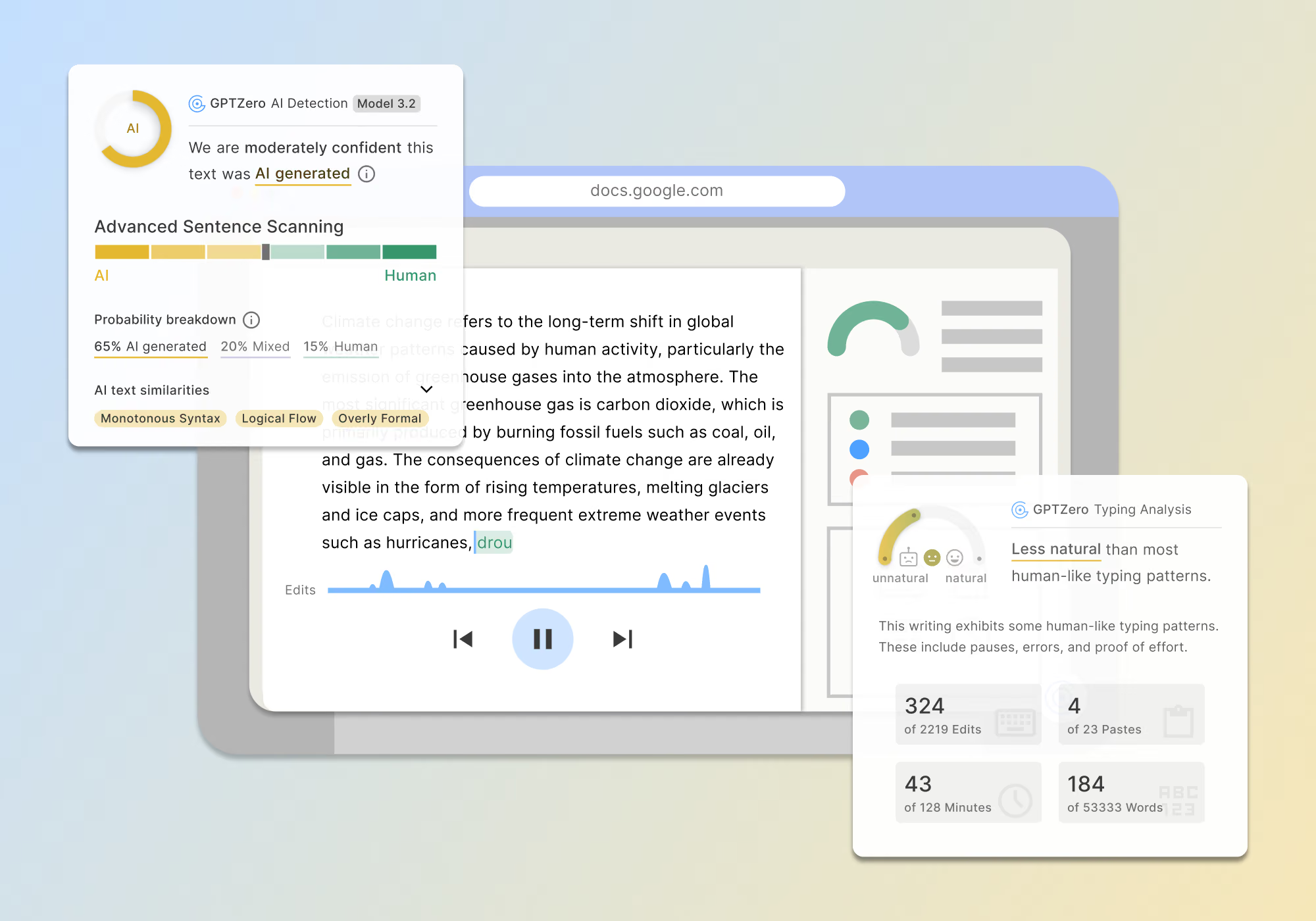
That said, detectors can make mistakes and flag human writing (false positives) or miss heavily edited AI text. This is why AI detection should be used as a starting point, as opposed to the final verdict on a piece of writing. A flagged result doesn’t automatically mean plagiarism or cheating; it just means the text shares traits often seen in AI-generated content.
How to avoid AI detection (responsibly): 10 effective strategies
While these tips can help you create work that truly comes from you, they cannot guarantee a particular detector score.
1. Use AI to support your thinking instead of replacing it
AI can help clarify your ideas or check grammar, but the core of the final piece needs to be yours. The main thing to remember is to use AI as a study partner, not a ghostwriter. AI is a tool for the writing process, not the product itself. If ChatGPT writes your entire essay, you are clearly outsourcing your thinking and missing the chance to refine your own voice.
If your institution allows this type of assistance, it’s better (and safer) to use AI at the research and brainstorming or the editing stage. For example, for brainstorming, you could get AI to create a list of essay questions and then draft the essay in your own words. For editing, you could check if the structure of a sentence (that you’ve written yourself) is correct by putting it into an AI tool.
2. Never copy and paste AI text
It can seem so easy to copy text straight from an AI tool directly into your assignment, but it’s also one of the quickest ways to get into trouble. Copying and pasting text directly from an AI tool means you risk breaking academic integrity policies, even if you think it's harmless. Also, it can be more obvious than you think when something has been written by AI.
Start your draft from your own reading and notes. The basic rule to follow is: if you didn’t think or write it yourself, then it doesn’t belong in your final draft.
3. Add in personal examples and insights
The quickest way to put your own voice into your writing is to make sure your own experiences or observations are in it. While AI can summarize research and explain theories, it can never talk about your experiences or opinions. This is what makes personal writing so much more powerful than AI-generated copycat text.
This also builds your critical thinking. When you link concepts from the classroom to your own experiences, you show you understand the material (instead of just parroting it back), and teachers appreciate it because it shows genuine learning.
It’s crucial to have balance: don’t use an essay as a diary entry, but look for opportunities where your own voice can appear. This is the most foolproof way to avoid AI detection, as it’s almost impossible for an AI detector to mistake it for machine-generated text.
4. Mix up sentence length and style
Rhythm is one of the biggest giveaways of AI-generated writing. Sentences that have been written by AI tend to be very evenly structured, as in, similar in length. This makes the writing sound flat and predictable. Human writing is a lot more natural and has a mixture of sentence length and style.
Sentences that all sound the same make for pretty boring reading, because they drain your writing of energy. This is also the kind of writing that increases your chances of getting flagged by an AI detector, since that uniformity is a red flag. An easy way to prevent this is to read your work out loud. If it’s monotonous and repetitive, then make sure you combine shorter as well as longer sentences in the same paragraph.
5. Use an AI vocabulary tool to avoid sounding like a bot
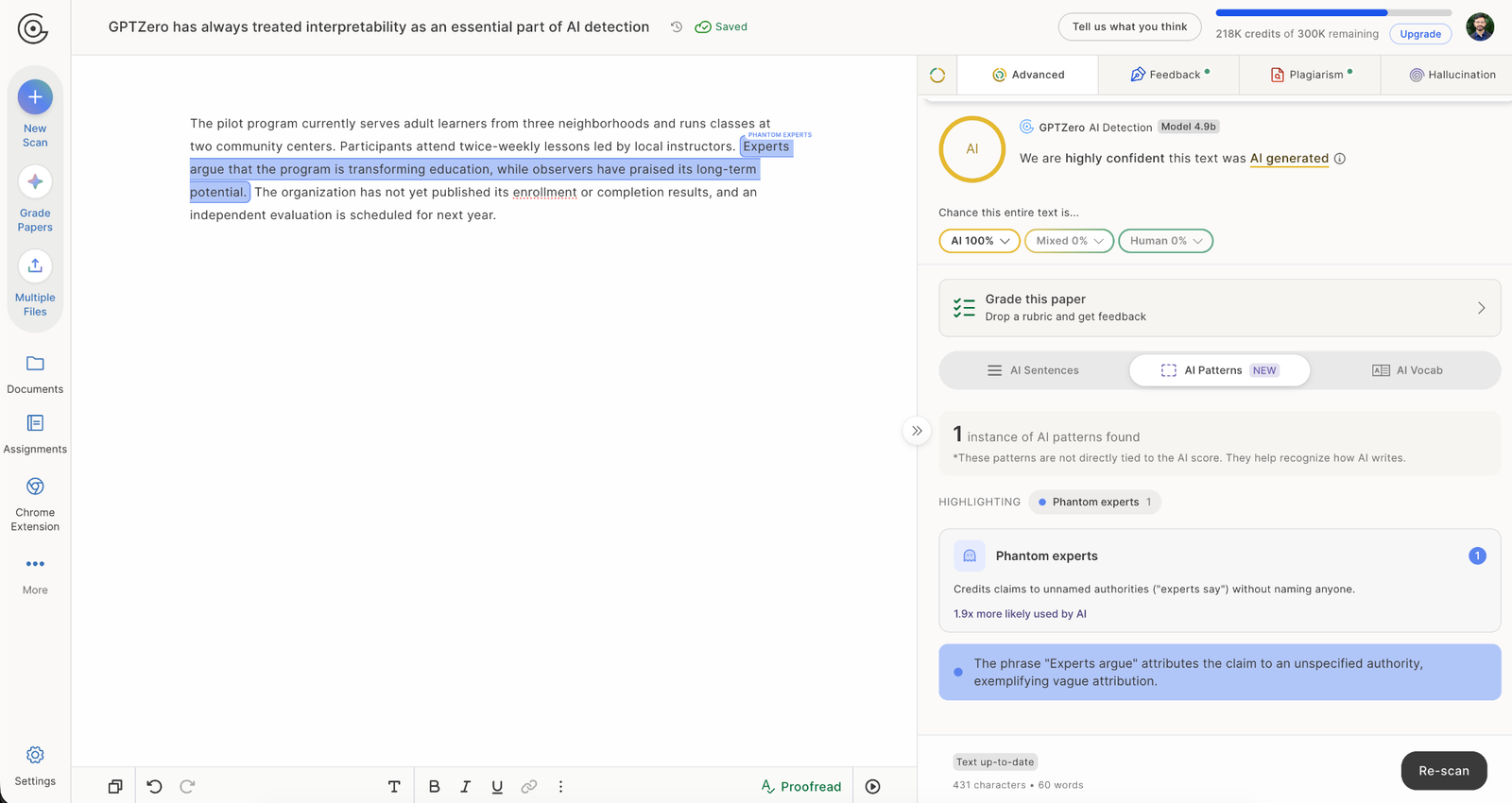
AI tools tend to default to vague and predictable phrases (e.g., “significant impact”), which is why it can be quite dull to read. When you look over your writing, keep an eye out for the most frequent words that generative AI tools like ChatGPT overuse.
You can use an AI vocabulary tool to make sure you don’t sound like AI. Forbes has also created a list of the most overused AI words, which is updated monthly. If you catch any of them in your own writing, replace them with an alternative, as the more human (and therefore interesting) your writing will feel.
6. Make sure you follow the relevant policies or rules
Since we’re still in the early days of AI, a lot of schools haven’t yet set firm rules around AI use. Different classrooms have different rules, so make sure you check with your syllabus or professor before you start an assignment, and ask questions if you aren’t sure about anything. Some professors may encourage you to use tools like ChatGPT, and others might ban them completely.
When you check your school’s academic integrity guidelines, watch for specific references to AI or “generative tools.” If you can’t find anything, don’t assume it’s fine to use AI. This is because using AI without permission can lead to serious consequences, like failing an assignment or more serious disciplinary action. Even if your intentions were good, claiming that you “didn’t know” the rules won’t protect you.
7. Include a process statement
If using AI is permitted for your assignment, and you used AI, make sure that when you turn in your work, you explain how you used it. You can use GPTZero’s Writing Report – this can help you make sure your process is documented by showing off your edit history with our Writing Report Chrome Extension.
You can also write a process statement: a brief note explaining how you completed the work and whether you used AI along the way. It could just be a few sentences: “I used ChatGPT to help brainstorm possible essay topics, then chose a topic and wrote the full essay myself. After I wrote it, I asked ChatGPT to suggest grammar improvements, which I then applied selectively.” This way, if an AI detector flags your work, your teacher will see how it got there, which can help prevent misunderstandings.
8. Cite AI as a source
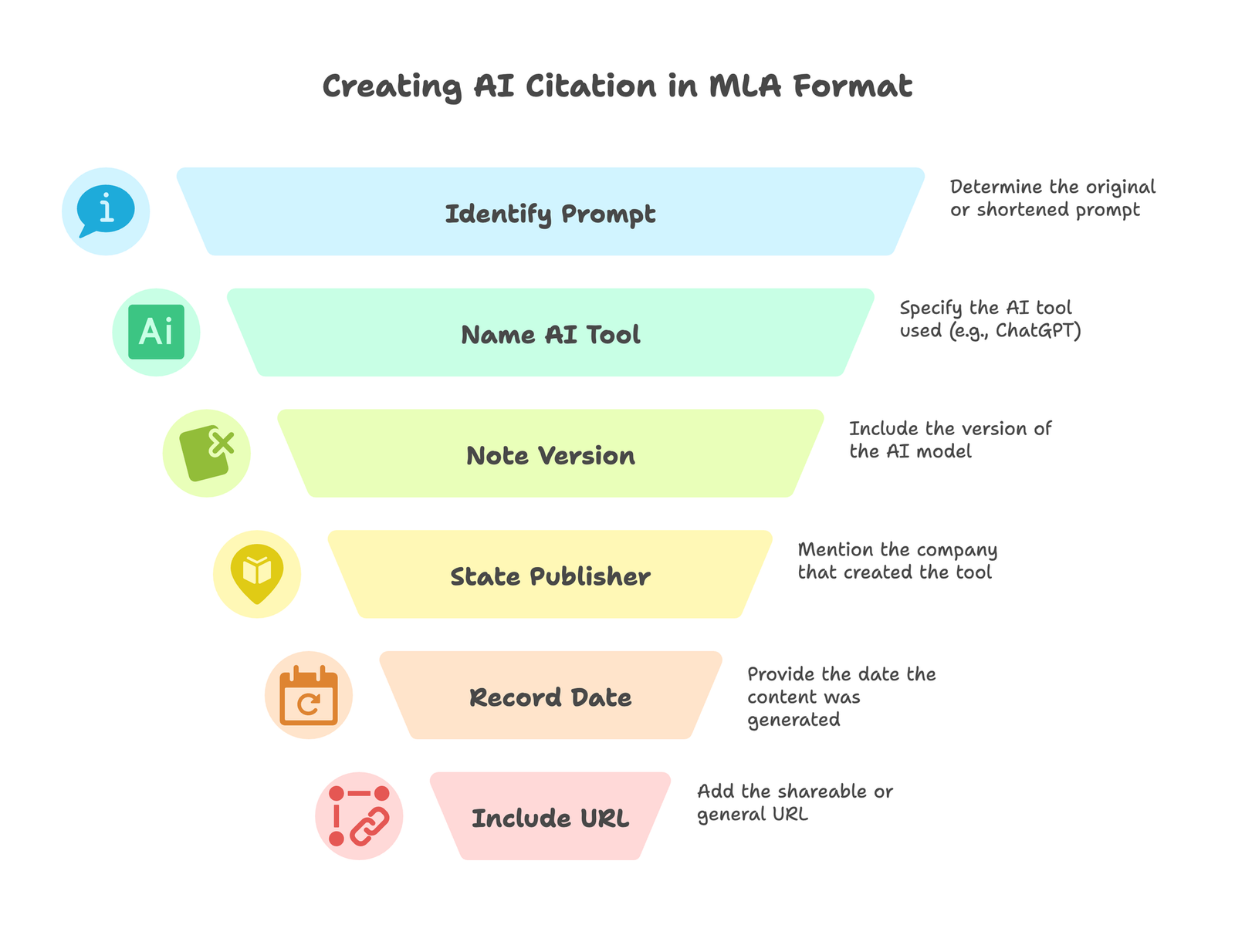
Just like you would cite a book or website, you can cite AI as a source if you feel that it heavily influenced your thinking and the creation of your work. It can be as brief and simple as writing, “This section was informed by brainstorming prompts generated by ChatGPT on April 10, 2025.”
Some schools have specific guidelines for citing AI, often based on MLA or APA formats. If your institution doesn’t provide clear rules, there’s nothing to stop you from creating a note yourself. If you don’t disclose AI use, that can raise serious academic integrity concerns, even if you didn’t intend to do anything wrong.
9. Check work with GPTZero before submitting
Before you hand in your assignment, run it through a tool like GPTZero to see how it might be flagged. This helps you to see where there might be generic phrasing, or a lack of specific detail or personal voice. Remember, if a section is flagged as “likely AI”, you don’t have to panic. Instead, see why that might happen, and make the required edits.
It’s also a good idea to run your work through a plagiarism checker, even if you didn’t copy anything directly, because it will show whether you’ve paraphrased too closely or forgotten to include a citation. AI detectors are useful feedback tools, which is why including a process statement and talking to your teacher can help prevent misunderstandings.
10. Prioritize your human voice over sounding like a bot
It goes without saying, but the most ethical way to avoid AI detection is to write something only you could write. Bot writing tends to be suspiciously perfect, with flawless grammar and polished sentences, but it’s also extremely uniform and smooth. AI detectors often flag text that lacks the small quirks and natural variety that come with human writing.
Instead of perfection, your teachers are looking for your effort and your growth. A slightly imperfect paragraph that was actually written by you is far more valuable than a perfectly polished one that was written by AI. Your unique voice is your best bet against AI detectors, as it’s what makes your writing both unique and memorable.
Why Responsible AI Use Matters
As AI models get more advanced, detectors are constantly updating to keep up. This means something that might get by a detector today could get flagged six months later as the software improves. If you’ve copied AI text into your work, it could come back to you later, even if it seemed fine at the time.
It’s also worth remembering that text watermarking is already in use to increase transparency around generative AI: Google has SynthID for text from the Gemini app and web experience, while Anthropic supports text watermarks. Although the scope and access to watermark detection are still in early stages, it can essentially indicate that a model processed text.
Some students turn to AI bypass tools, but they don’t tend to work, and we’ve expanded our own AI detection models by increasing the scope of our training data, adding new text domains and prompts to our database.
Ultimately, learning to use AI responsibly only protects your own critical thinking and writing skills in the long term. As leading educators such as Sir Anthony Seldon have declared, AI is “the most transformative innovation to impact education ever”, posing “the biggest challenge to young people’s safety and mental health, to intellectual rigour and to the integrity of assessment”.
The ethos at GPTZero has always been to preserve what’s human. “People are allowed to use these tools however they see fit,” says GPTZero founder Edward Tian. “At the same time, I feel a profound sadness for the internet at large. It's important to make sure we still have human-written content online.”
GPTZero’s features for original, authentic writing
At GPTZero, our tools are designed to improve the writing process and help both students and teachers:
AI Detection
We show patterns in text that suggest AI involvement, so teachers know where to look more closely. Our new model, GPTZero 4o, offers even more reliability for mixed and modified AI text, with broader training and easier-to-understand results.
It’s our most accurate model yet, and it outperforms competitors across major 3rd party benchmarks. Notably, it deliberately tackles the harder cases for AI detection: AI-generated text that has been paraphrased or mixed with human writing. We’ve added features to make results easier to understand, including AI Patterns and Masked Detection.
Writing Report and Writing Replay
The Writing Report provides playback and information about how a document developed, and Writing Replay is the playback experience within that report. To use it inside Google Docs, all you need is the GPTZero browser extension (along with a signed-in account) and edit access to open the report yourself. A student can also send you a shared report link. The ultimate goal of this tool is to walk a viewer through how a document has come to life.
This will show the recorded development of a document, including edits and pastes, to support any conversations that come up around the writing process. Much like X-rays of the document creation process, these tools enable you as a student to demonstrate how your work came together. As an educator, they give you valuable information if you need to start a conversation about the authenticity of a student's work.
Plagiarism Checker
Plagiarism Check compares your document with text that already exists: websites, scholarly articles, research papers, and books. GPTZero’s plagiarism checker draws on over 100 million of those sources. It shows how much of your text overlaps with them, which passages overlap, and where those passages came from.
Conclusion
AI detection will only get better over time, which is why it’s fairly pointless to try to cheat the system. Instead, focus on creating work that reflects your own thinking, and use AI as a support tool as opposed to a way to outsource your thinking. Following the tips above will help you avoid most detection issues. While AI can help, it’s the progress and the voice behind your words that teachers will always want to see.
FAQ
Can AI writing be detected?
Yes, but not with totally flawless accuracy. Instead, AI detectors look for patterns common in AI writing, but results are probability-based and can be wrong.
What are AI detection tools?
These are models that analyze text to estimate whether it was generated by AI, and it is being used in schools and education institutions worldwide.
How can I make AI-assisted writing sound more human?
Make sure to include your own personal observations, a mixture of sentence lengths, and specific (not generic) language.
How accurate are AI detectors?
No detector is perfect, and any detector can falsely flag human writing or miss AI text entirely. Use them as signals, not the final verdict.