
How To Avoid AI Detection As A Writer
Has AI taken over your writing, and now you’re finding it hard to bypass AI detection? Learn how to avoid AI detection in writing using 6 effective strategies.


The accessibility of generative AI tools has led people from all walks of life and age groups to use them for their day-to-day needs.
The other day, I came across a video of a 5th grader using AI to write his essay. I have also seen people use ChatGPT responses to prove a point in debates.
With this pace, you might also have gotten hooked on it. There’s nothing wrong with this in itself. It starts becoming a problem when you outsource your thinking to AI. In other words, when you rely on AI too much, especially for writing on your behalf. This has the risk of slowly robbing you of your writing skills.
The most pressing issue amid all of this is AI detection. The work you submit gets checked for AI using AI detectors, and these tools, especially the leading ones like GPTZero, can pinpoint whether you used AI just a little or relied on it completely. If they find AI patterns in your writing, they flag it as AI, and that is a quick way to lose your credibility.
Therefore, knowing how to avoid AI detection has become an essential skill for writers. But don’t worry, it’s not rocket science. We’ll be discussing 6 actionable tips to help you make your writing AI-free. But first, let’s understand why AI shouldn’t write on your behalf.
Why is it Problematic to Write Something With AI?
Before we discuss how to avoid AI detection in writing, you need to know why you should avoid AI detection in the first place. What is so wrong with it that you’re required not to use it for writing?
A recent study by the National Bureau of Economic Research (NBER) shows that writing makes up 40% of all work-related tasks people hand over to ChatGPT.
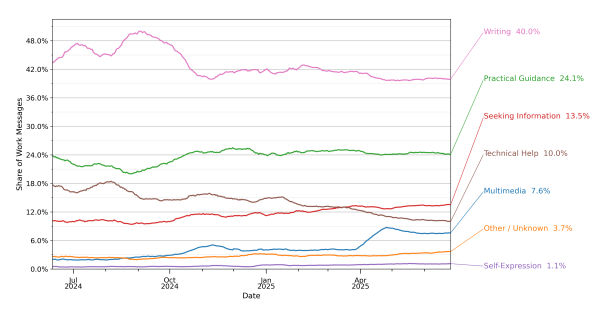
And people in management and business roles are the heavy users here. The study finds that more than half of all their work prompts are writing-related.
Writing is supposed to be a human-to-human medium. When AI enters professional and formal settings at this scale, it’s bad news for the trust your reader has in your writing.
And it’s more than just about trust for students. For instance, in classrooms, it becomes harder to tell whether a student actually learned something or just knew how to prompt well. Letting AI write their entire assignments robs students of the learning opportunities of manually doing the work.
The trust factor is more important in certain writing formats where you’re writing for readers, instead of for some personal benefit like grades.
Even if readers can’t explicitly tell that the content is AI-written, they can tell when something feels off.
That’s because AI-generated text tends to be too formulaic and polished. It lacks the natural quirks that make human writing interesting. So when readers sense that something has been written by a machine, they lose both trust and interest. They’ll bounce back from your article, and your search engine rankings are going to be hurt.
But let’s say the audience isn’t an issue for the type of writing you do. Why should you care about AI detection then? Due to AI detectors.
It has become standard practice in workplaces and schools to run submissions through AI detection tools like GPTZero. Recently, HackerNoon has partnered with GPTZero to preserve what’s human in tech publishing. Not to mention that the accuracy of AI detection tools keeps getting better.
Even if you make AI-written text bypass AI detection today, it could get flagged six months from now as the detection accuracy improves.
With enough reasons to avoid AI detection, let’s show you how to prevent AI detection in writing.
How to Avoid AI Detection in Writing: 6 Tips
Here are some foolproof ways to keep your writing free from AI patterns.
Tip #1: Don’t Outsource Writing to AI
This needs to be said in the beginning because it’s where the problem starts.
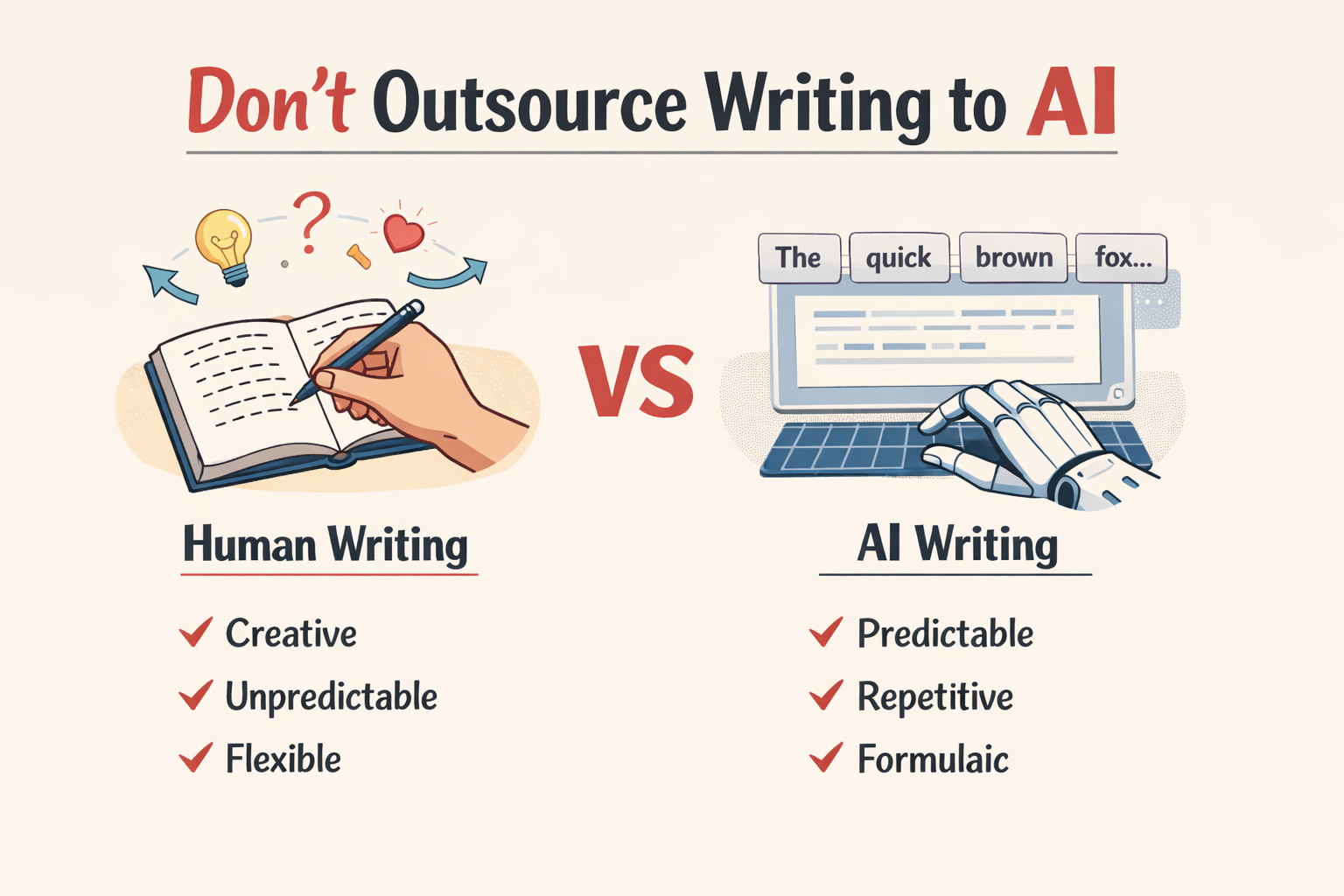
Don’t task AI to write for you. Even if you prompt it to write, never copy-paste the output. The moment you do that is the moment AI-detection probability enters your document.
AI can never replicate the way humans write. Even with seemingly perfect prompts, machine language is bound to carry AI patterns.
It simply cannot write like us humans. We don’t write by predicting what word is most likely to come next. We tend to make unexpected writing choices. We can change direction mid-thought. We also use words that might not be the most statistically probable option for what we’re trying to convey.
AI lacks this unpredictability. It tends to repeat the same set of writing patterns that it picked from its training dataset. Its word choices are also precise.
But that doesn’t mean AI is good for nothing. You can use it as a writing assistant. For instance, you can ask it to check the grammar of something you wrote in haste. Or if you’re stuck on how to phrase something or you're looking for a better word choice, AI can be incredibly helpful.
AI is also extremely good at helping in the pre-writing phase. You can use it for brainstorming ideas or outlining the structure of your document.
Tip #2: Scan Text for AI Using GPTZero
It's easy to convince yourself that your prompt was so well-written that the AI somehow managed to write like a human this time.
But you could be wrong. That output could be the most human output for your eyes only. But for an AI detection tool, it can have several AI patterns.
So make it a habit to check your text for AI using an AI detector, especially if you’re taking inspiration from AI output or rephrasing it.
And make sure to use GPTZero for this job because it’s the most accurate of all AI detection tools.
GPTZero’s AI detector also highlights the specific sentences that are the most AI-sounding. You’ll be saving time by fixing only the sentences that are causing AI detection.
Testing GPTZero’s AI Detection Capability
Let’s generate a 200-word commentary by ChatGPT on the impact of layoffs on employees' mental health in a human writing style.
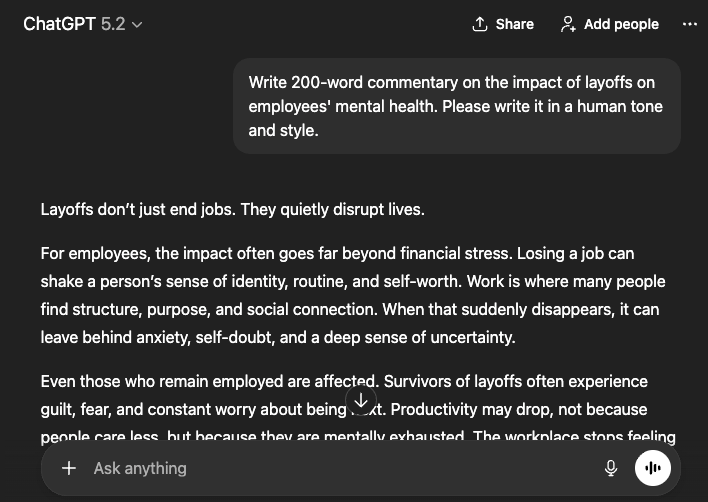
Now, let’s paste this ChatGPT-generated text into GPTZero’s AI detector and see if it can detect the content as AI.
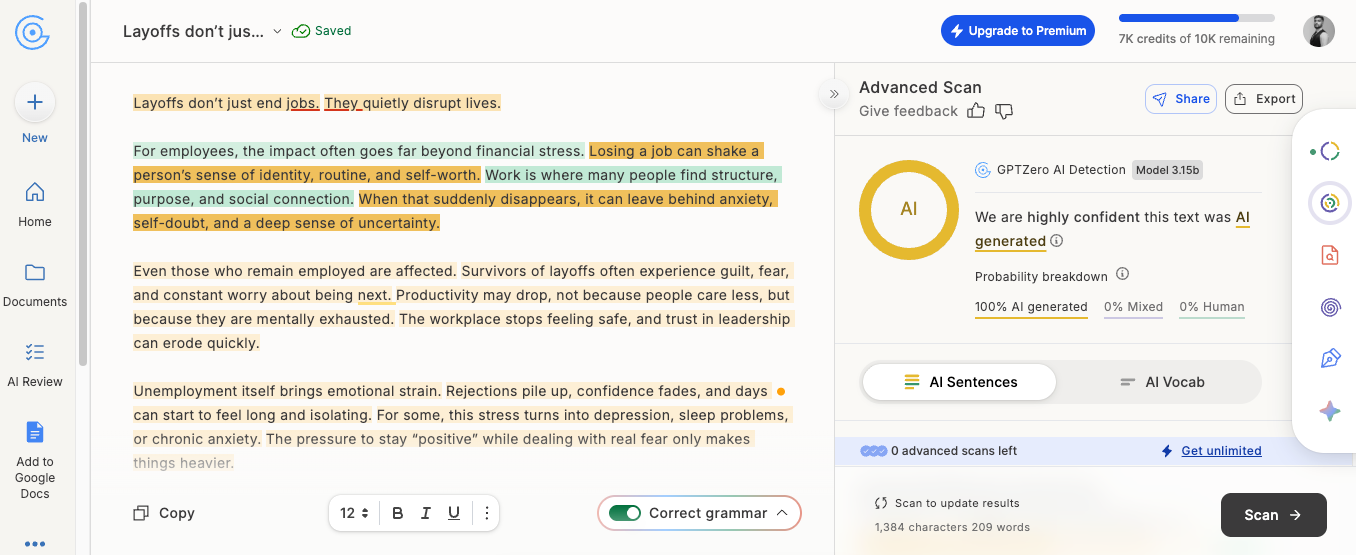
As you can see, GPTZero correctly identified the whole content as 100% AI, although it was written in a human style by ChatGPT.
There’s also a side benefit of using GPTZero. If your text passes GPTZero's scan and registers as human, it's going to pass other accurate AI detectors too, which your teachers or anyone reviewing your text might be using.
That’s because when GPTZero calls something AI or human, that’s true 99% of the time.
Tip #3: Avoid Overused AI Words & Phrases
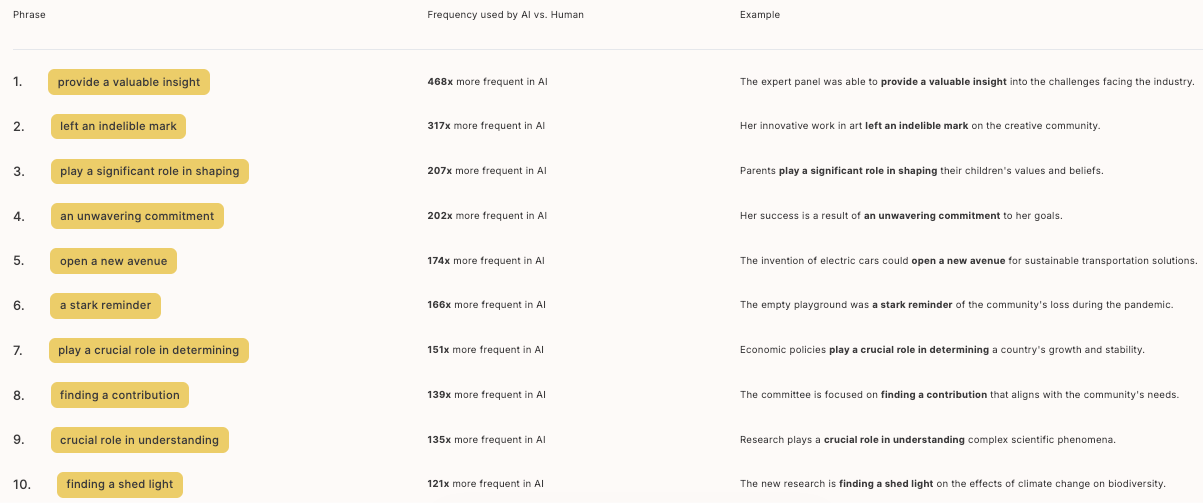
There is a long list of words and phrases that AI models love a little too much.
They use these words constantly, whether the context calls for it or not.
You've probably seen "dive in" or “delve into” more times than you can count. Or “showcasing” when a simple “showing” would have worked fine.
And it’s not just words and phrases. AI overuses entire constructions. The infamous "in today's fast-paced world" opener comes to mind. But there are plenty of others. "Play a crucial role in determining," "it's important to note that," "a myriad of," and the list is never-ending.
These words and phrases aren’t inherently bad or wrong. But their overuse by AI has made them red flags.
Let’s show you this in action by prompting ChatGPT to generate text on anything.
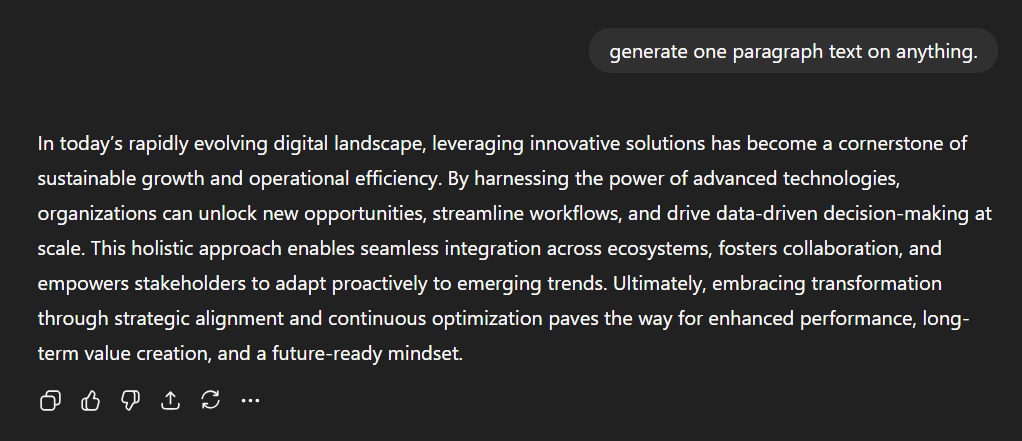
Notice how formulaic the wording and phrasing are.
You need to avoid writing formulaically like this. This could be difficult in the beginning because you may have unconsciously picked up AI patterns if you've been reading a lot of AI-generated content.
You can use our AI Vocabulary tool. The tool scans your text and lists common AI words and phrases you might have used.
Tip #4: Avoid Classic AI Sentence Structures
AI also has an unhealthy obsession with some sentence structures that it keeps recycling.
So you’ll have to avoid or at least tone down their usage in your writing. But first, learn what those sentence types are.
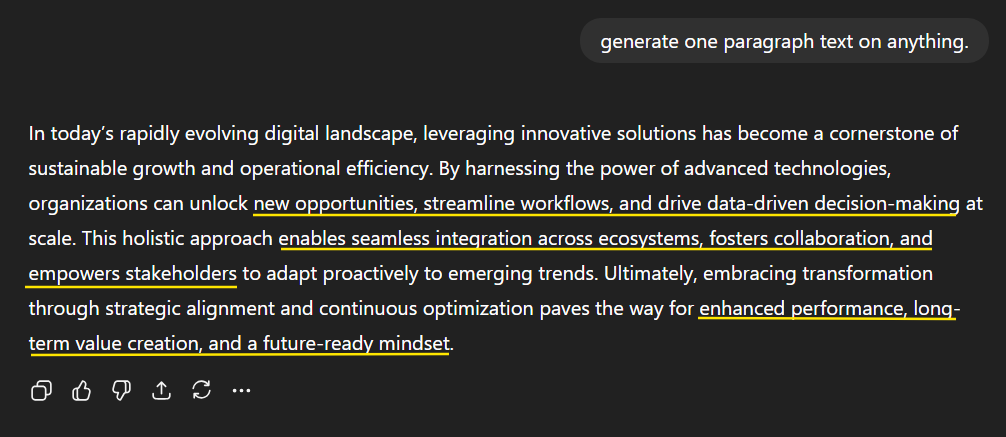
The most common of these sentences are probably the ones with tricolon lists. AI loves listing things in threes.
For instance, look at the following two examples:
- "It's fast, efficient, and reliable."
- "We need to plan better, communicate clearly, and execute consistently."
People also refer to this type of sentence as AI’s rule of three. No matter how explicitly you tell AI not to use this type of sentence, it ends up using that, that too, after every few sentences.
Just revisit the ChatGPT output in the previous section and notice the number of times the rule of three appears in just a short span of time.
Then there’s the structure, which combines a question (in the form of a fragmented sentence) and its answer. Look at these examples:
- "Want to improve your productivity? Start by eliminating distractions."
- "Struggling to meet deadlines? Try breaking projects into smaller tasks."
Sentences with colons and em dashes are also commonly found in AI-written texts.
Again, all these sentence structures aren’t bad or wrong. But humans don’t use them as commonly as AI does.
Tip #5: Add Personal Anecdotes
Another limitation of AI models is that they haven’t lived through anything like us.
That’s why they cannot add personal touches to content.
For instance, if AI writes about a software, it won’t be able to write what it’s like to use the software. It cannot tell what the interface looks like or where a certain button is located unless that information is made available to it.
Even if AI attempts to include personal anecdotes on your behalf, there’s a chance it’ll mess up the description somewhere, or it’ll discuss them formulaically.
Therefore, you should write by yourself. No other human, let alone AI, knows about your experiences. And only you can decide where a certain personal experience adds value and where it doesn’t.
Google also likes it when a writer incorporates their experience in the writing. It gets the impression that the writer has firsthand knowledge of the topic, which causes it to display the content higher in search results.
Google uses the EEAT search quality guidelines to rank content. EEAT stands for:
- Experience
- Expertise
- Authoritativeness
- Trust
Tip #6: Include Proof of Authorship/Originality
Sometimes AI detectors find AI in your writing even when you wrote everything by yourself.
There can be two reasons for this. As we mentioned before, you could have internalized AI’s writing style by coming across AI-written content too much. Or it could simply be the AI detectors’ inaccuracy because they aren’t perfect.
So what’s the way out of this? How can you prove your innocence in such a situation?
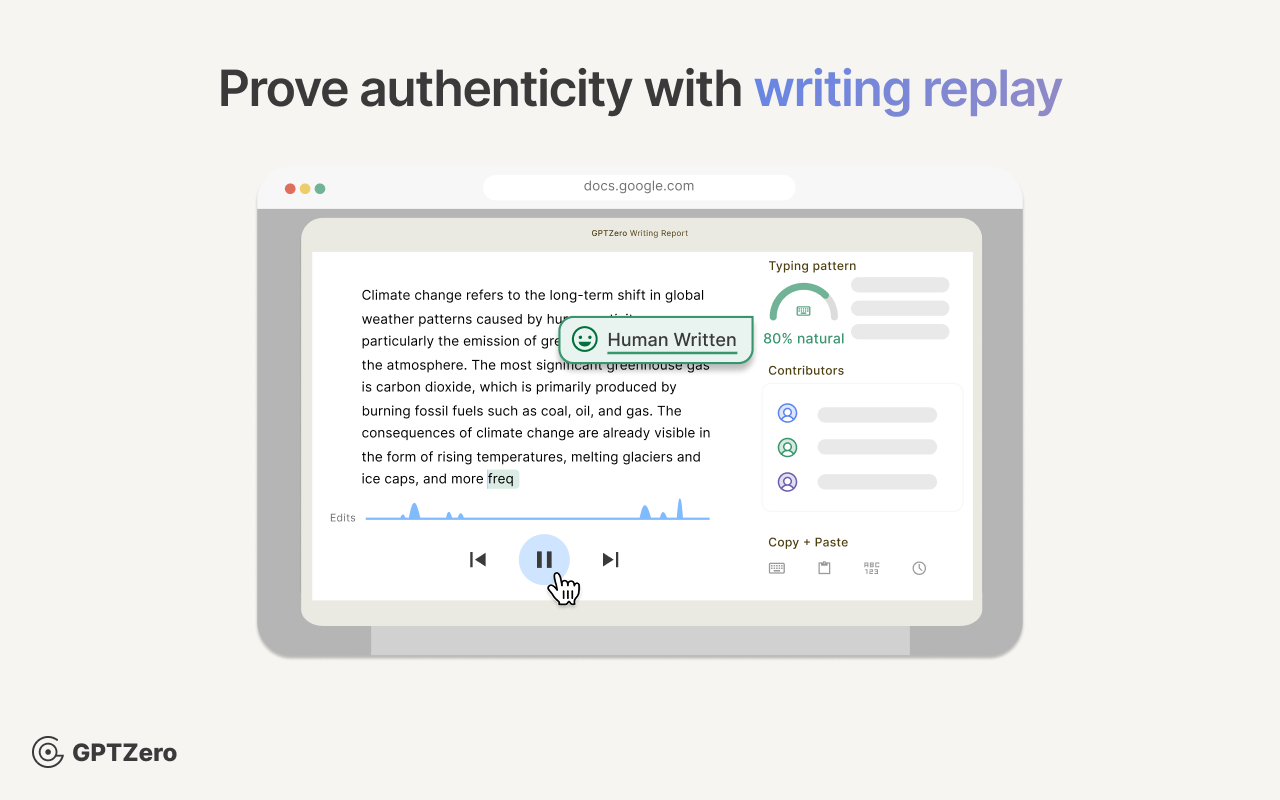
GPTZero offers a solution to this, too. You can plug in our Writing Replay tool to Google Docs. The tool creates footage of your writing process in real time as you work.
You can then share this video with your submission to show that you haven’t copy pasted anything. Or to show that you have copied only specific things.
Read more about writing replay tools in our article.
How to Avoid AI Detection in Academic Writing
We have an article that covers 10 highly effective strategies on how to avoid AI detection in writing assignments as a student.
It discusses similar tips to what we discussed here. The only extra tips are to check each assignment’s rules as well as your school’s academic integrity guidelines.
Your school might not have a blanket ban on the use of AI tools. Instead, there could be certain guidelines on how you can use them.
You’ll also find out if your institute allows citing AI as a source. If that’s the case, your work can become a lot easier.
GPTZero Promotes AI-Free Responsible Writing
The use of generative AI tools for writing carries the risk of making human writing extinct.
At GPTZero, we help you not to fall victim to this. That’s why, in addition to guiding you on how to avoid AI detection, we also offer tools to prevent this looming civilizational downfall.
Our biggest offering in this cause is our AI detector, which has outperformed all other AI detectors in accuracy on the massive independent RAID benchmark. We are going to improve the accuracy of our AI scans even more.
Next, we have the best-in-class writing replay tool, which provides the most conclusive way of checking content’s originality.
We also offer a plagiarism checker with a free scan limit of 10k words per month.
Our paid plans for all these tools are just as generous with the words/month limit without costing much.
Start using GPTZero now and leave no trace of AI in your writing.